
|
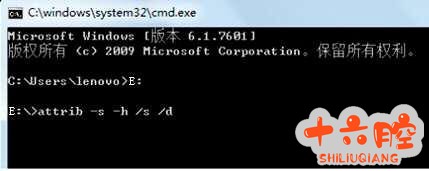
Problem description: When a virus is detected on a mobile hard drive or USB drive, it can cause files or folders to be hidden and generate an executable file with the suffix exe. The executable file of. exe can be cleared by antivirus software such as Mcafee or 360, but the hidden file or folder properties cannot be changed. Cause analysis: The file or folder is hidden and its properties cannot be changed. Solution: 1. Click on "Start" in the bottom left corner of the screen. 2. Run the program "cmd". 3. Enter the removable disk in DOS state. First, check the drive letter of the removable disk, such as the "F" drive. Enter "F:" and press enter, You can enter "F: \>". 4. Enter "attribute - s - h/s/d" under the moving drive letter as shown in the figure below, pay attention to the space, and press enter. Wait for a moment, when "F: \>" appears again, check the removable disk again, and the hidden attributes of the folder have been removed. (You can avoid - s, sometimes errors may occur.) Note: Others: (with drawings)
|
Address of this article:https://073868.com/post/887.html
Copyright Notice:
For relevant infringements, reports, complaints and suggestions, please send E-mail:weixiuwang68@qq.com
Tags: #Folder #hidden file #U disk #portable hard drive #virus







