
|
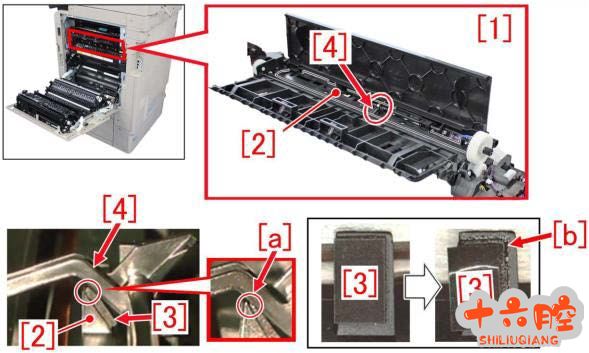
Canon color copier double-sided printing process occurred 010A paper jam repair method Applicable product series: iR-ADV C3330/3325/3320/3320L iR-ADV C3530/3525/3520 iR-ADV C3530III/3525III/3520III iR-ADV DX C3730/3725/3720 iR C3025/3020 iR C3125/3120L [Failure Phenomenon] 010A paper jam occurred during the double-sided printing process. 010A: Reverse sensor delay paper jam. [Cause of Failure] The shock-absorbing pad [3] on the reverse guide plate [2] of the single-sided paper discharge component [1] will undergo deformation as shown in Figure [a] due to repeated collisions with the end of the reverse sensor lever, resulting in the loosening and displacement of the shock-absorbing pad itself. In this case, the adhesive surface originally used to stick the shock absorber pad [3]It may be exposed and may stick to the end of the sensor lever [4] when it collides with it. This will result in the 010A paper jam causing paper discharge failure.
[Maintenance measures] First, remove the damaged shock absorber pad and clean its adhesive surface, which can solve the above-mentioned 010A paper jam fault. Attention: The shock pad parts currently do not have a number and cannot be ordered normally; If the customer is concerned about the noise generated after removing the shock pad, please contact Canon to obtain the shock pad parts. |
Address of this article:https://073868.com/post/6007.html
Copyright Notice:
For relevant infringements, reports, complaints and suggestions, please send E-mail:weixiuwang68@qq.com







