
|
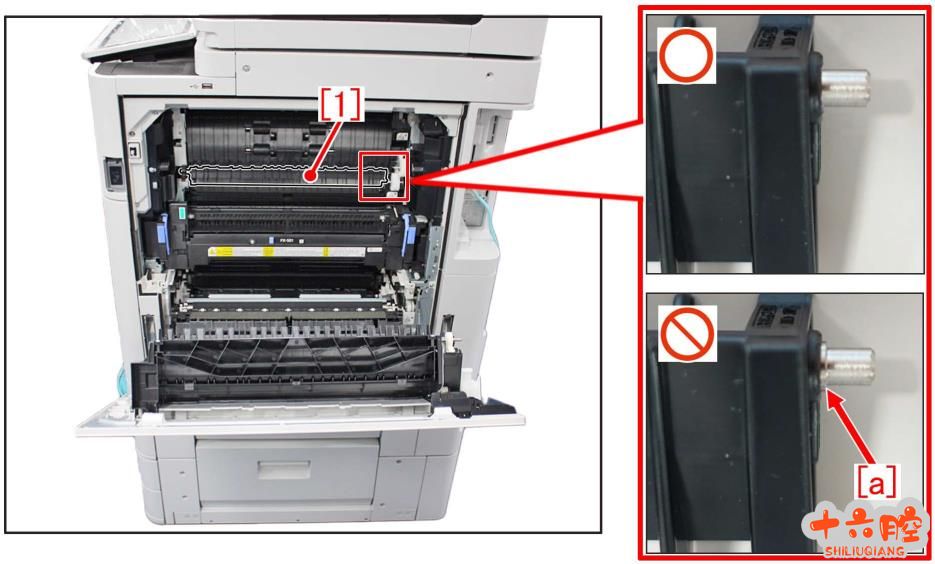
Canon iR-ADV DX C5870, C5860, C5850, C5840 Canon iR-ADV DX 687068606855 Topic: Countermeasures to solve the paper jam problem in 0109 Fault phenomenon: 0109 paper jam occurred -0109 Paper jam: First paper feeding sensor (PS20) delayed paper jam Cause of the failure In rare cases, insufficient axial pressure on the rear side of the baffle may eliminate the pushing force of the paper feeding baffle assembly. Therefore, when the sliding performance of the paper feeding baffle component decreases, the paper cannot pass through the paper feeding port, resulting in the above-mentioned paper jam problem. The upper right corner of the photo below shows the correct axis inserted. The photo in the lower right corner shows that the axis [a] of the pressed part protrudes due to insufficient pressing of the axis.
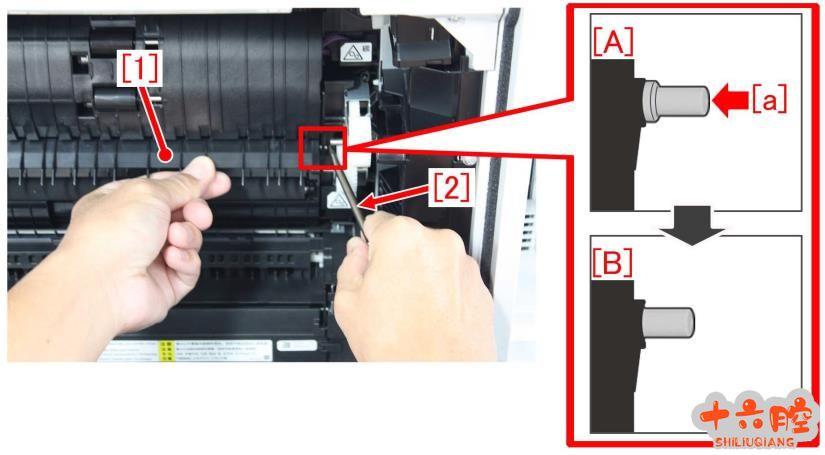
Maintenance work: When the above phenomenon occurs, a straight screwdriver should be prepared and operated according to the following steps. 1) Open the right door of the host. 2) While supporting the paper feeding baffle assembly [1], use a flathead screwdriver [2] or the like to push the axial direction in front of the main unit (arrow direction [a]). Figure [A] shows insufficient shaft compression, while Figure [B] shows correct shaft compression.
3) Move the paper feeding baffle assembly to ensure its smooth operation 4) Close the right door and the adjustment is complete. |
Address of this article:https://073868.com/post/5963.html
Copyright Notice:
For relevant infringements, reports, complaints and suggestions, please send E-mail:weixiuwang68@qq.com
Tags: #C5870 #6860 #0109 #Sensor #paper feed baffle







