
|
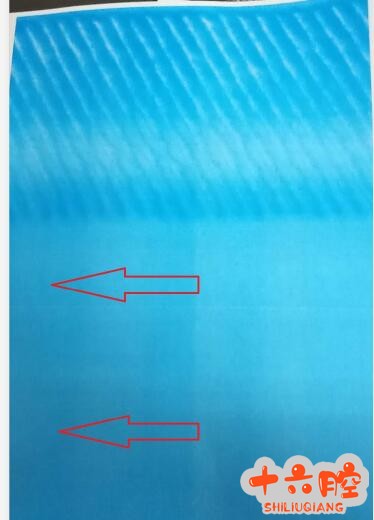
IM C2000/C2500/C3000/C3500/C4500/C6000 Ricoh IM C2000 Print Copy Cyan Blue with White Stripes In color mode, blue has stripes, and the fault sample is shown in the following figure: the arrow direction is the direction of paper feeding
Diagnostic process 1) The initial malfunction of this machine was a shallow strip of blue color in the horizontal direction of the paper output. The technician suspected that there was a foreign object inside the blue developing unit. After repair, the malfunction occurred as shown in the above sample image. 2) Upon detailed inquiry, it was found that the technician had encountered the above-mentioned malfunction after cleaning the developing chamber and developing roller on site. It is suspected that the position of the developing magnetic roller scraper is abnormal, leading to the above-mentioned malfunction. 3) After dismantling the developing chamber on site, comparing the faulty sample image, adjusting the position of the far side developing magnetic roller scraper, the final image was normal. Solution After adjusting the position of the blue developing magnetic roller scraper, the image is normal. Note The position of the developing blade has been adjusted to the optimal position before leaving the factory. Do not adjust it during on-site repairs. |
Address of this article:https://073868.com/post/5784.html
Copyright Notice:
For relevant infringements, reports, complaints and suggestions, please send E-mail:weixiuwang68@qq.com







