
|
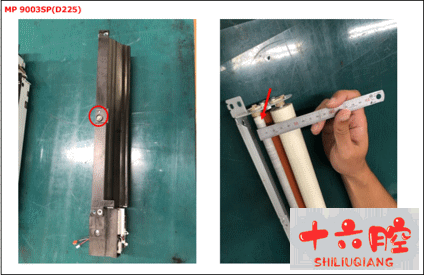
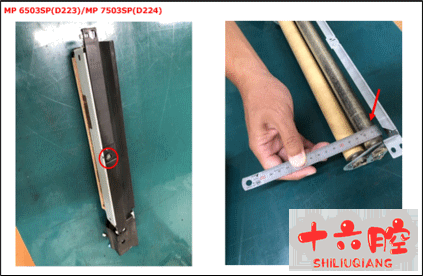
SymptomsMP 7503 Fault code S appearsC669-36At the same time, the screen displays "Please replace immediately: Fixing cleaning unit: oil screen". But after replacing the oil network, the prompt message will continue to appear. ReasonThe performance variation of EEPROM and the specific combination of machine operating conditions may result in the data volume of the oil network counter exceeding the limit of the storage area reserved by EEPROM for oil network counter data. Note:Even if this limit is exceeded, other functions of the reserved area will continue to function normally.Note:·If this SC occurs, the latest oil network counter data will not be retained in the EEPROM.·Therefore, if the message "Please replace immediately: fixing cleaning unit: oil screen" appears together with or after SC, the message will continue to appear even after installing a new oil screen.Solution:1. Update the engine firmware to Ver.1.12:02 (firmware number: D2235127L) or higher.If SC669-36 still appears, or even after installing a new oil screen, the message "Please replace immediately: fixing cleaning unit: oil screen" still appears, please follow these steps:; A. Replace the EEPROM of the BICU board;B. Measure the diameter of the winding roller; (If the machine has not been used after replacing the oil screen, please skip this step.)
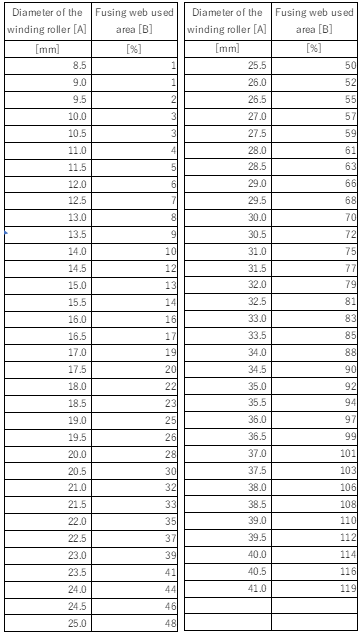
CIn the table below[A]Select a value close to the diameter of the winding roller in the column and match it accordingly[B]Column value inputSP1-902-001In the middle; Important Notice: If replacement is requiredOil netHowever, during installationOil netIf you haven't used the machine afterwards, please check here SP Input value in the middle“zero”According toMaintenanceManual No 4 In the sectionOil netUnit reassembly process).For example:If the diameter of the winding roller is 13.4 mm:· From column [A] Select from the middle“13.5”。· This corresponds to the column [B] in“9”。At SP1-902-001 Input value in the middle“9”。
|
Address of this article:https://073868.com/post/5728.html
Copyright Notice:
For relevant infringements, reports, complaints and suggestions, please send E-mail:weixiuwang68@qq.com
Tags: #SC669-36 #Fixed cleaning unit #Oil net #7503 #6503







