
|
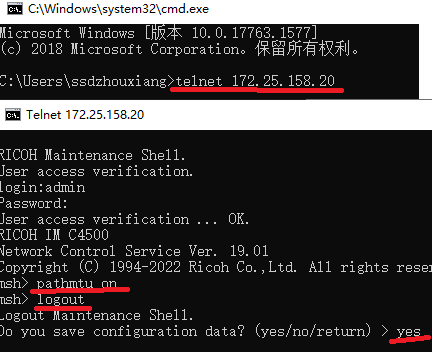
Symptoms Scan to mail send failed. Fault phenomenon: Prints a list of network configurations (SP5-990-7) with 501,701, and 801 errors in the system log. Solution: This situation usually occurs when the packets sent by the MFP are fragmented by the router and the firewall discards these fragmented packets. To avoid this problem, have the MFP detect the maximum transmission unit (MTU) of the network path to the destination. This function is called "PathMTUDiscovery". The specific steps are as follows: Use telnet to log on to the MFP and use the pathmtu on command to enable the PathMTUDiscovery function.
|
Address of this article:https://073868.com/post/1375.html
Copyright Notice:
For relevant infringements, reports, complaints and suggestions, please send E-mail:weixiuwang68@qq.com
Tags: #Scan to Mail #Send failed #c3500 #c6000 #PathMTUDiscovery







