
|
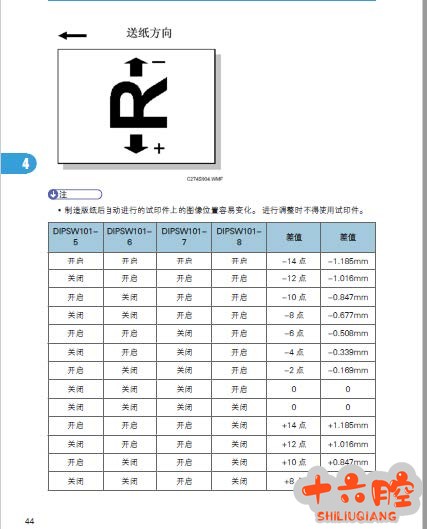
After replacing the MPU board of DD2433C all-in-one machine, there is a black line on the edge of the main scanning direction of the plate making and printing printed product image. Reason The writing position of the paper does not match the original and printed images. Maintenance process During inspection, it was found that the main scan of the printed image was offset, causing black lines at the edges of the image. After adjusting the writing position of the paper, the fault was resolved. Solution Refer to the maintenance manual to adjust the writing position of the plate paper, position 5-8 of DIP switch SW101 on the MPU board
|
Address of this article:https://073868.com/post/5706.html
Copyright Notice:
For relevant infringements, reports, complaints and suggestions, please send E-mail:weixiuwang68@qq.com
Tags: #DD2433C #CP6203C。 Ricoh






