
|
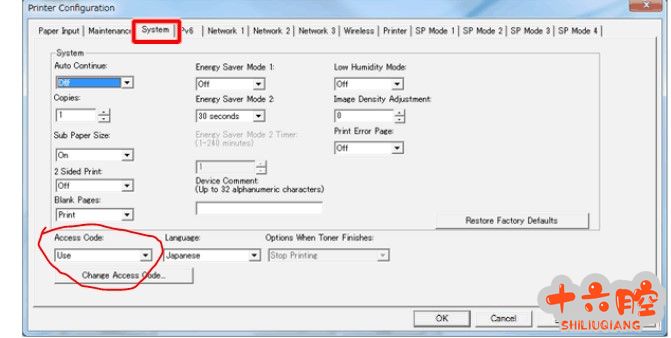
Symptoms After starting SOM with SP31DNw, clicking on User Tools - Printer Configuration will not display an inquiry box for entering the access password and will directly enter the settings of the User Tools. Related models: SP310DN/312DNw/310DNwV/313DNwV/SP320DN/325DNw/325SNw/SP330DN Reason Because the customer has set the access code option in the system settings to not be used, there will be no query box for entering the access code after entering SOM and clicking on printer configuration, and the machine's maintenance mode cannot be accessed. Solution Set up block diagram:
The red thin line box in the picture represents the access code usage settings. Select 'USE' and restart the machine to apply it. Setting method Download from the official website, start the SOM utility ->click [User Tools] ->click [Printer Configuration] ->click [System] ->set [Access Code] to [Use] |
Address of this article:https://073868.com/post/5617.html
Copyright Notice:
For relevant infringements, reports, complaints and suggestions, please send E-mail:weixiuwang68@qq.com






