
|
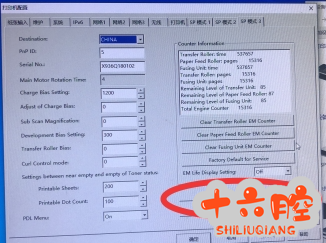
Symptoms:The machine displays fault code: SC542 (confirming fixing unit fault), and the machine also prompts that no toner can be detected Reason:Poor contact between carbon powder and chipMachine data lossUpgrade machine firmware Maintenance process:1. Replace the fixing unit to eliminate the SC542 fault, but the machine cannot detect the powder fault still exists;2. Replacing the AIO component, the machine still cannot detect the powder fault;3. Mistakenly clearing the data in SOM (as shown in the red circle in Figure 1), the machine still cannot detect the powder fault;
Precautions:After clearing, the following settings must be completed:In printer configuration:Destination: Set to(CHINA); PnP ID is set to(5); Senal NO is set to(Machine body number) EM Life Display Setting is set to(off) Solution : Upgrade the machine firmware, set data, test the machine, troubleshoot, and test the machine successfully. |
Address of this article:https://073868.com/post/1123.html
Copyright Notice:
For relevant infringements, reports, complaints and suggestions, please send E-mail:weixiuwang68@qq.com
Tags: #SC542 #Cannot detect toner #313DNwV #310DNwV #312DNw







