Ricoh color copier IMC2000-C6000 proximity sensor working principle and operating settings
Come back soon.3860
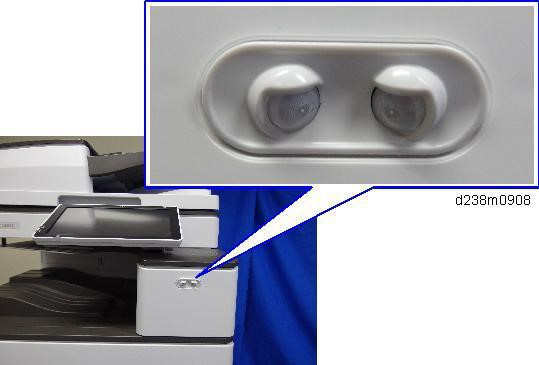
Working principle and operating settings of IMC2000-6000 proximity sensor Attention: The proximity sensor of this series of models does not directly release energy-saving and complete standby mode after sensing the operator's approach to the machine, but shortens the time required for the machine to resume full operation (pre recovery mode) The proximity sensor is located in the upper right corner of the host.
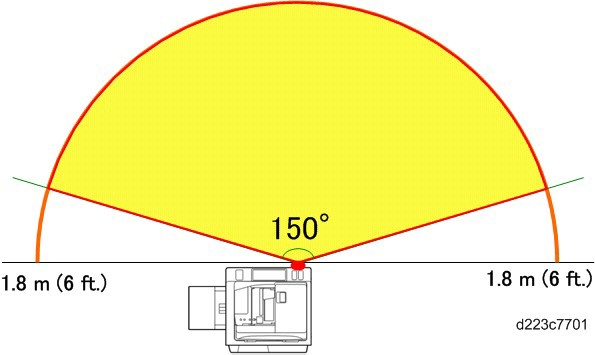
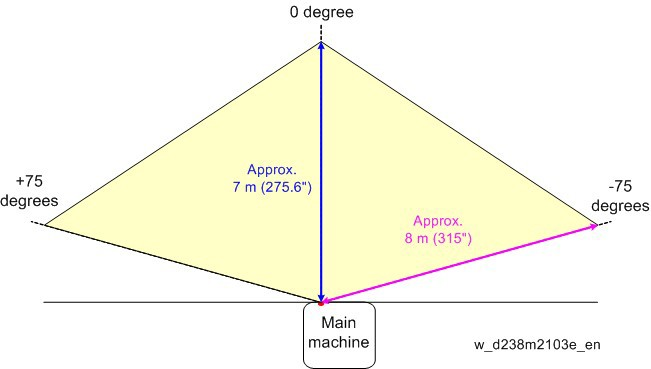
After the machine has been idle for a long time, when the proximity sensor detects someone in front of the machine, the sensor will send a signal to the machine in front of the operator touching the machine or operating panel, preparing the machine to quickly recover to its operating state and shortening the time required for the machine to return to full operation (pre recovery mode). The proximity sensor adopts infrared technology and can detect whether it is within a distance range of 1.8 meters (6 feet) in front of the machine, with a radius of 150 degreesThere are operators present
The following image shows the coverage area of the sensor on the ground.Basically, the sensor can detect operators approaching the machine from a distance of about 1.8 meters. However, it is also possible to detect individuals passing through this area. The detection performance of this infrared sensor is affected by the ambient temperature. The detection distance increases when the ambient temperature is low and decreases when the ambient temperature is high. As a reference, when the ambient temperature rises to 28 ° C or above, the detection distance decreases from 1.8 m. The sensor diagonally covers the area in front of the machine and detects the legs (approximately at the knees) of a person. Its detection performance is affected by the type of clothing worn by personnel.
Sensor operationThe operation of proximity sensors is divided into three stages:In the first stage, the sensor detects an operator within the arc range in front of the machine and sends a signal to the machine to exit STR mode (or engine shutdown mode) and enter pre recovery mode.In the second stage, after entering pre recovery mode, the machine immediately resets the engine shutdown mode timer to 5 minutes. If the operator does not touch the machine within 5 minutes, the machine will return to engine shutdown mode. If the operator touches the LCD, or opens and closes the ADF or front door, etc., the machine switches to standby mode.In the third stage, after the machine enters standby mode, if the operator does not start operating, the machine will gradually transition from standby mode to low-power mode, quiet mode, engine shutdown mode, and finally enter STR mode.Operation ModeBelow is more detailed information about these work mode levels.STR mode Temporarily stored in RAM mode. The CPU, adjacent chips, and clock on the controller board are powered off.Engine shutdown mode The fixing lamp and other engine components remain turned off. The backlight on the control panel is turned off, but the control panel and controller board are powered on.Pre recovery mode. The control panel and HDD are turned on, but the engine components remain turned off (energy-saving mode). However, the operation backlight still remains off, so there is no change on the operation panel to indicate that the machine has transitioned from STR mode to pre recovery mode through engine shutdown mode.Quiet mode The fixing lamp remains turned off, but the HDD and SD card can be accessed, so the machine can receive jobs (data input) and inbound faxes.Low power mode Finally, the power supply to the fixing lamp was restored, but kept at a low temperature. Standby mode The machine is ready to run. Run SettingsThe operation of proximity sensors can be turned off and on using the "User Tools" settings.1. Touch the "Settings" icon on the control panel.2. Select System Settings>General Settings>Human Detection Sensor3. You can turn off/on the sensor by selecting 'disable/enable'. The default setting is' enabled '. Related SC codesIf the proximity sensor malfunctions, one of the following two SC codes will be issued. SC869-01 proximity sensor fault: Error 1.The sensor remains on for more than 480 hours.Closing and reopening the machine did not fix this error.When this error occurs, the machine enters sensor failure mode and ignores subsequent inputs from proximity sensors.Even if the sensor is turned on, the machine will not enter pre recovery mode, but the engine shutdown timer setting is not affected and will continue to operate normally.To fix this error, please use the "Settings" menu described in the previous section to turn off the proximity sensor. The sensor and its components need to be replaced. SC869-02 proximity sensor fault: Error 2Even after the operator performs 300 operations using the machine control panel to open and close the front door, ADF, etc., the sensor remains closed. After every 300 operations on the machine, this error code will be issued.Closing and reopening the machine did not fix this error.To fix this error, please use the "Settings" menu described in the previous section to turn off the proximity sensor. The sensor and its components need to be replaced. Related SP codesThere is an SP code related to proximity sensors: SP5102-203 Automatic Detection: Human Detection Check. This is an on/off check.Enter '0' to turn off the sensor. Enter "1" to activate the sensor.This SP is used to check the operation of the sensor. It confirms that the sensor can be turned off and on normally. (Default value: enabled). This check can be used regardless of the settings of the 'User Tools'. Even if the sensor is turned off using the 'User Tools', this SP code can still be used for inspection. Ricoh IMC2000-C6000 power on self-test displays error code SC370 https://www.16qiang.cn/forum.php?mod=viewthread&tid=15827 Explanation of Ricoh IMC2000-C6000 VSG adjustment and TD sensor initialization results//ww.073868.com/forum.php?mod=viewthread&tid=15828 Explanation and Detailed Explanation of Ricoh IMC2000-C6000 Line Position Adjustment Results//ww.073868.com/forum.php?mod=viewthread&tid=15829 Interpretation and detailed explanation of process control results for Ricoh IMC2000-C6000//ww.073868.com/forum.php?mod=viewthread&tid=15830
5-804-001 paper feed motor 15-804-002 paper feed motor 25-804-003 paper feed motor 35-804-004 paper feed motor 45-804-005 hand feed paper feed clutch...
Q: One piece of original powder is printed less than 2 kilometers. When the machine is turned on, it is found that there is a lot of powder leakage on the transfer roller. After removing the development and cleaning ID sensor, will the 3103Vsp value 0.07 be too low and a large amount of powder will be added?...
A collection of firmware upgrade methods for all current Ricoh models. Note: No matter which of the following methods is used for firmware upgrade, do not shut down during the upgrade process, this operation will cause damage to the machine hardware. 2. A3 models firmware upgrade SD card production...
Ricoh copier basic principle, imaging principle and copier foundation, color basic principle 1, imaging principle and copier foundation 2, color basic principle 3, machine test sample printing 4, parts manual use training materials 5, dot map use method m...
Symptoms: Keith Deyer cp6303c Machine Printing Times Failure E-02 Causes: 1. Paper table motor problem and poor paper table drive; 2. The height sensor of the paper table and the lower limit sensor of the paper table are not good. 3. Bad motherboard. 4. Harness connection...
Issue: Exporting a profile configuration that contains a large number of workflows and groups does not start the download and cannot be displayed. Occurring condition: A user attempts to export a profile configuration that contains a large number of workflows and groups. Reason: Due to the group and work being processed...
Ricoh IM C320F_P C375_M C320FW Solution to Drum Unit Setting Error after Memory Clear Symptoms When Memory Clear: Clear All (SP:5-801-001) is performed, for example, due to forgetting to log on...