
|
Symptoms:During use, there is often no response when copying or printing. When copying, after the original manuscript is scanned, the machine stops working. The check status shows that copying is in progress and there is no job output. (This state will continue until the machine is reset) Reason:
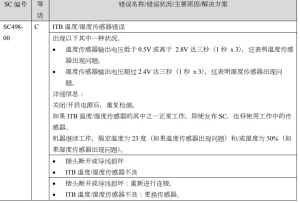
Maintenance measures: 1. According to the count, replace the black drum, black carrier, drum cleaning unit, and charging unit. The malfunction persists. 2. Clean the ID sensor, but the fault persists. 3. Replace IOB, CTL, HDD, BICU, memory module, hard disk data cable, four drum potentiometers, etc., but the fault persists 4. Discovered code 498-00 through SMC recording, replaced temperature/humidity sensor for testing, and resolved the issue.
Solution: Replace the temperature/humidity sensor and observe for nearly two months, the fault has not reappeared. Note: The temperature/humidity sensor located on the right rear side of the machine can detect temperature and humidity. This sensor will affect potential control (developer stirring time, target developer gamma measurement) and charging current adjustment. |
Address of this article:https://073868.com/post/5502.html
Copyright Notice:
For relevant infringements, reports, complaints and suggestions, please send E-mail:weixiuwang68@qq.com
Tags: #Drum potentiometer #ID sensor #humidity sensor #C8003 #crash






