
|
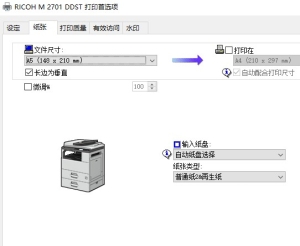
M2700 / M2701 / IM2702 Symptoms: When M2701 machine paper tray 2 prints A5 paper, it will prompt for paper size error and will not automatically output paper Reason: Set A4 paper in tray 1 as long side feed, and set A5 paper in the additional tray 2 (PB2030) as short side feed (PB2030 paper box 2 only supports A5 short side feed). The default paper setting for print driver preferences, 'Vertical long edge', is checked. As shown in the figure: Driver default settings:
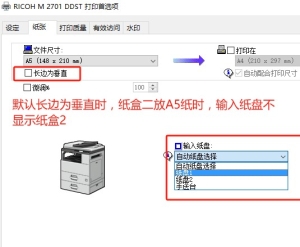
Analysis: As PB2030 paper tray 2 only supports A5 short side feeding, and the print driver defaults to "long side vertical", the two are compatibleContradictory, so when printing A5 size files, the machine will prompt an error in paper size and cannot automatically select paper for printing:
Solution: When printing A5 size files, after removing the default "long side vertical" hook of the driver, you can select tray 2 for normal output. |
Address of this article:https://073868.com/post/5489.html
Copyright Notice:
For relevant infringements, reports, complaints and suggestions, please send E-mail:weixiuwang68@qq.com
Tags: #M2700 #M2701 #IM2702 #Paper tray 2 #Wrong paper size






