
|
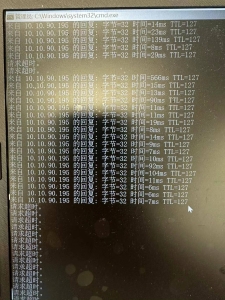
Symptoms: The initial issue was with MC250FWB, which the customer reported frequently going offline. After on-site inspection and testing of PING on the customer's local area network, there was indeed a disconnection phenomenon, but there was no offline or disconnection phenomenon after direct connection to the computer!
Multiple M 320s experienced frequent automatic restarts, but after disconnecting the network cable on site, the machines were functioning normally and did not restart! Based on the two reported faults, it is suspected that there are network restrictions or data attacks at the customer's location that may have caused the printer to experience the aforementioned faults, But the customer said that he completed the network layout without any restrictions, just the simplest core switch. Then test the binding of the machine's MAC address, use DHCP, change the machine's sleep setting to not sleep, reset the machine settings, and test the customer's voltage of 225.2 (normal range) on the restarted machine. Despite many attempts, the customer's problem cannot be solved! The customer's IT department checked the logs on the switch and found that the problematic printer port is congested, and packet loss occurs whenever congestion occurs! Final solution: At this point, it can be basically determined that there is still a network problem at the customer's location, which may be due to compatibility issues between the switch and printer, or a customer's laptop being infected in the local area network and sending commands to the printer port. Teacher Wang Dongqing suggested that, without affecting the customer's local area network, several printers can be set up with separate VLANs (virtual local area networks). Inform the customer IT of this method, and after setting up the printer VLAN, test it for several days without any previous failures, basically solving the problem! |
Address of this article:https://073868.com/post/5484.html
Copyright Notice:
For relevant infringements, reports, complaints and suggestions, please send E-mail:weixiuwang68@qq.com
Tags: #C250FWB #offline #C320 #Auto-restart #LAN






