
|
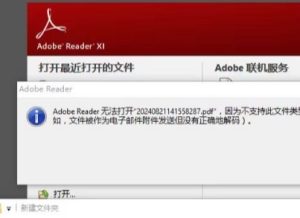
Symptoms A Ricoh IM2500 cannot open files after PDF scanning through the panel USB interface. Fault screenshot:
Possible causes: Setting issues/software issues/firmware issues/network issues/board issues/chip issues Maintenance process 1. Confirmed the specific fault phenomenon of the machine on site. After on-site confirmation, the PDF files scanned by the machine to folders, email, and TWAIN can all be opened normally. Only the scanned files (PDF) through the USB port on the machine panel cannot be opened, and JPEG and TIFF files are also normal; 2. Replace the new USB drive for testing, and the fault persists; 3. Change the application software for opening PDF, Adobe Reader and Adobe Acrobat PRO cannot be opened; 4. Execute SP5-801 from 3 to the last code, invalid; 5. After backing up the data using SP5-824, executing SP5-801-1 to clear the data still does not work; 6. Upgrade the latest firmware package and perform another scan test to eliminate the fault; Solution The malfunction was caused by the firmware version and was resolved by upgrading the firmware package again; |
Address of this article:https://073868.com/post/5481.html
Copyright Notice:
For relevant infringements, reports, complaints and suggestions, please send E-mail:weixiuwang68@qq.com







