
|
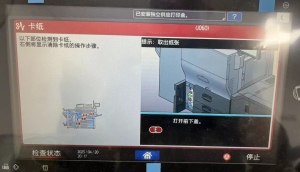
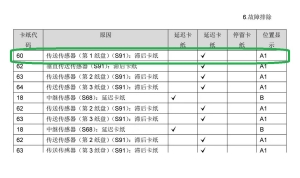
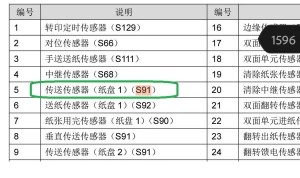
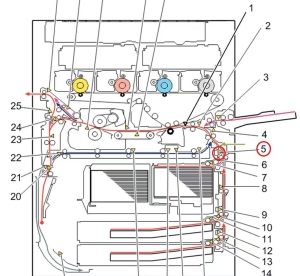
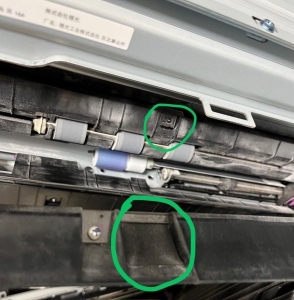
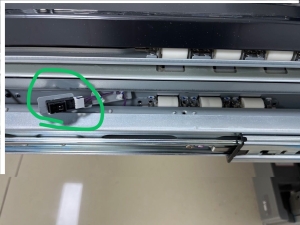
Symptoms: The machine frequently experiences J060 paper jams, Maintenance process: 1. Cardboard explanation: The first paper tray transport sensor (S9) lags behind the paper jam,
According to the explanation, after cleaning the sensor of the first paper path rubbing unit, the fault still persists,
2. After cleaning the first paper path vertical sensor and relay sensor, the fault still persists,
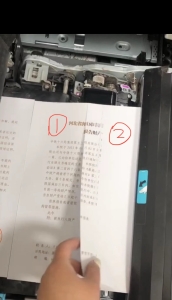
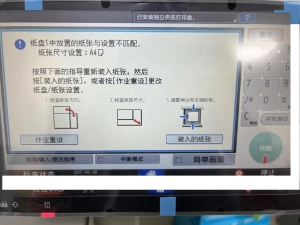
3. The test found that every time there was a paper jam, it occurred at the transfer belt. Two A4 sheets were connected together, and the first sheet was tightly attached to the second sheet in the middle. After removing the paper jam, it prompted that the paper size did not match the setting. After clicking 'Load Paper', printing continued
4. After cleaning the paper path roller once, the fault still persists. After replacing it with a new set of rollers, the fault persists, 5. Test printing A4 paper on the second paper path, but the fault persists 6. According to the test results, there is a paper jam phenomenon and incorrect paper shape prompt. It is suspected that the paper has high static electricity and sticks when rubbing the paper The sensor detected that the A4 paper size exceeded the limit, causing frequent paper jams in J060, 7. Shake the existing paper as much as possible and test printing 300 sheets without any paper jams. Using this method, J060 occasionally experiences paper jams with a frequency of 0.05% -0.1%, 8. Suggest changing the paper, Repair Summary: After replacing the paper, the customer tested the printing and found no J060 paper jams |
Address of this article:https://073868.com/post/5476.html
Copyright Notice:
For relevant infringements, reports, complaints and suggestions, please send E-mail:weixiuwang68@qq.com







