
|
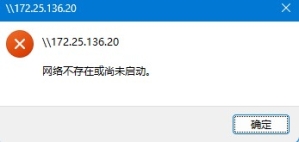
Symptoms: The user's computer reported an error when opening the address of the shared disk, indicating that the network does not exist or has not been started. The network shared folder that has been mapped can be opened normally, but the same error occurred when returning to the upper directory.
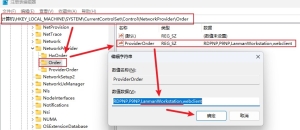
Processing procedure: 1-Check the network status of the user's computer connection, and ping the shared disk address can be ping normally. 2-View the Windows function services, file sharing support related SMB services are being enabled normally. 3-Because of the domain control computer, it is suspected that the domain control account cannot be opened due to the permission problem. Log in to this computer with another account with higher permission, but the same error is reported when opening the shared disk address. 4-Use the user account to log in on another domain-controlled computer and try to open the shared disk. The shared disk can be accessed normally. So far, it is determined that the non-account permission problem should be caused by computer settings. 5-Find method, enter the regedit in the Windows start menu, find and run as an administrator, open the registration editing table, and open the following path in the registry: HKEY_LOCAL_MACHINE\SYSTEM\CurrentControlSet\Control\NetworkProvider\Order; Double-click to open the ProviderOrder table, Add the LanmanWorkstation value to it and save it. Similarly, open the CMD command prompt box as an administrator and enter the gpupdate /force command to update the computer policy. After that, you can normally access and open the shared folder. Solution: 1. Enter regedit in the Windows start menu, find and run as administrator, Open the registry editing table and open the following path in the registry: HKEY_LOCAL_MACHINE\SYSTEM\CurrentControlSet\Control\NetworkProvider\Order; Double-click to open the ProviderOrder table, add the LanmanWorkstation value and save it.
2. Open the CMD command prompt box as an administrator and enter the gpupdate /force command to update the computer policy; After updating the policy, you can normally access and open the shared folder. |
Address of this article:https://073868.com/post/5473.html
Copyright Notice:
For relevant infringements, reports, complaints and suggestions, please send E-mail:weixiuwang68@qq.com
Tags: #Shared Disk #Windows







