
|
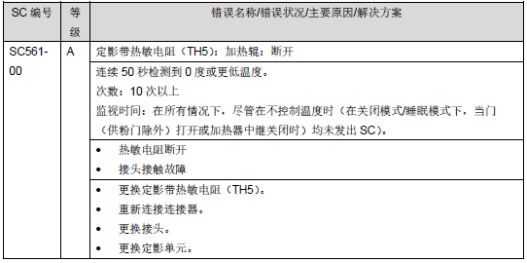
Symptoms: ProC5300S code SC561-00 during printing. 1. Paper size: 70 gsm A4 bond paper. Total print volume: 3 million A4 sheets. 2. If a paper jam occurs during printing, remove the jammed paper and then push the drawer back in; a code will be displayed. Power-on self-test will also report an error after 3 minutes. 3. Check SP7403, only SC561-00 code Reason: 1. Ask: First, communicate with the operator about the equipment, judge whether the fault is caused by human factors, and analyze carefully. 2. Maintenance manual: The code points to the fixing belt thermistor (TH5) maintenance direction thermistor sensor, wiring harness, machine and fixing plug, IH Inverter 3. SP code test: SP1106-002 check the true temperature of the fixing thermistor (TH5). 4. Circuit check: multimeter measuring sensor, fixing plug to sensor, base socket to IH board. 5. Hardware inspection: whether the fixing rotation is normal, and the bad rotation caused by the damage of the fixing bearing is excluded. 6, after the development of maintenance plan one by one maintenance inspection Solution: 1. See the explanation of the SC561-00 code in the corresponding manual.
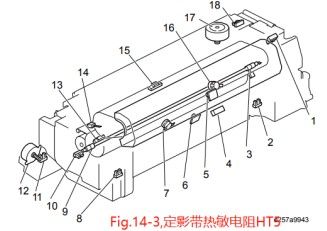
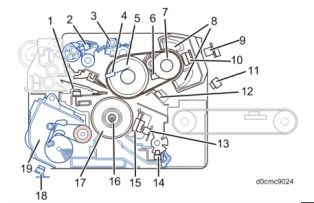
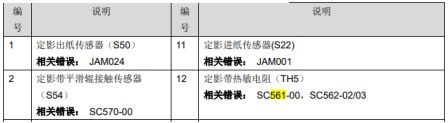
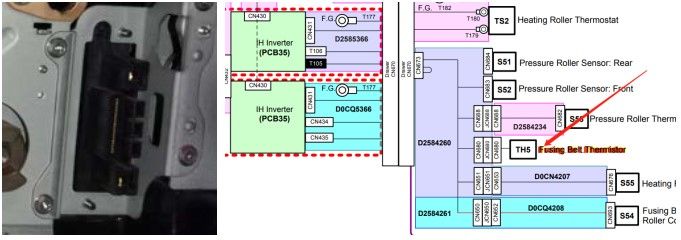
2. Determine the position of the fixing belt thermistor (TH5) in the circuit manual
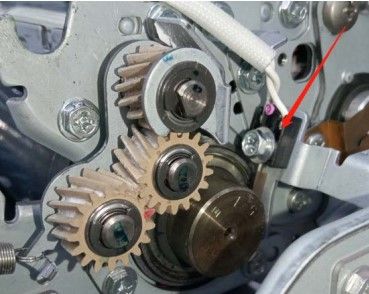
3. After confirmation, the fixing belt thermistor (TH5) is located at the fixing front end. Refer to the SP code 1106 item to check the fixing temperature display of the SP1106-002 number: sensor 2: heating: front end Device Normal Use This option Temperature is the normal range. The SC561 code appears and the value is displayed as a negative value. 4. Use a multimeter to check or replace the thermistor (AW100176) to determine that the sensor is normal.
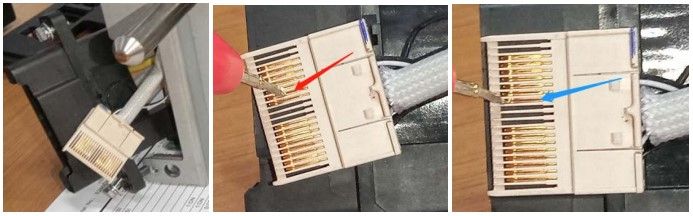
5. Measure the line from the sensor to the partial plug after fixing and find the line sequence. Find the right stitches.
It can be excluded that the failure of the fixing part causes the device code.
7. After the above inspection, the sensor and line are normal when the drawer unit is separated. Only in drawer unit During the push-in process, the high-frequency SP1106-002 items appear normally and negatively. 8. The final judgment is that the fixed plug is in poor contact with the socket of the rack. The plug often bears the impact of the impact of the drawer, resulting in being crushed and deformed, and poor contact. Temporary maintenance plan: bend the pin of the plug at the fixing end a little and increase the socket contact point. 9. Fixed piece: plug wire harness at fixing end: D2584260 Receptacle Harness at Rack End: D0CQ5366 4. repair results 1. First, communicate with the operator about the usage of the equipment, the performance of the failure, and read the Logbook. 2. According to the manual, refer to the meaning of SC561-00 fault, thermistor (TH5), wiring harness and plug. 3. Check the temperature value of the sensor when it is normal and faulty through the code SP1106-002. 4, one by one to determine the exclusion of sensors, wiring harness, IH board circuit fault. 5. After adjusting the pin angle of the fixing end, the plug increases the contact surface machine, and the equipment returns to normal. 6. Test and prepare parts replacement for many times after maintenance. 5. repair involves parts: 1. Plug harness at fixing end: part number D2584260 2. Socket harness at the rack end: D0CQ5366 6. summary: 1. Check the meaning of the SC561-00 according to the manual and check whether there is a hidden code in SP7403. 2. Output check Enter the SP code to check the sensor temperature. 3. Eliminate whether the connection of the sensor, wiring harness, plug and circuit board is loose or damaged one by one. 4. After finding the fault, use the temporary scheme to deal with and resume production. Then determine the parts to book quickly. 5. Pay attention to the deformation of the plug caused by the impact of the drawer switch for a long time, and spare it after 3 million. 6, the equipment to maintain a constant temperature and humidity working environment, do a good job of equipment cleaning and maintenance. The above operation is for reference only, thank you |
Address of this article:https://073868.com/post/5409.html
Copyright Notice:
For relevant infringements, reports, complaints and suggestions, please send E-mail:weixiuwang68@qq.com
Tags: #SC561 #Thermistor #c5300 #c5310 #Fuser






