
|
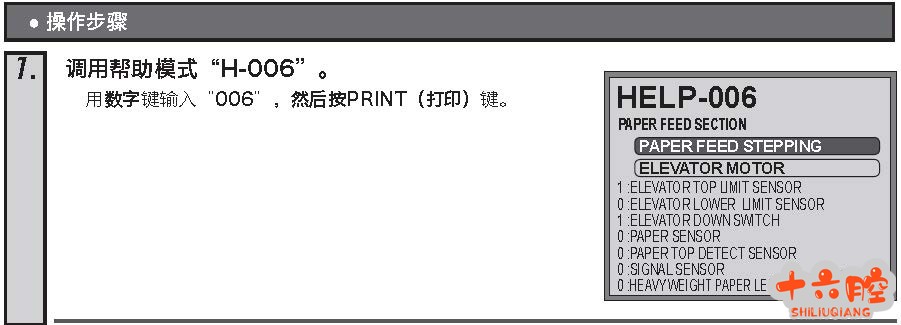
During machine printing, the first sheet of paper gets stuck at the timing roller (alignment roller). Maintenance process 1. When the machine is printing, the first sheet of paper gets stuck at the timing roller. From the feeding action, it can be seen that the paper head stops conveying after reaching the timing roller; 2. By checking with HELP-006, the alignment signal sensor can detect changes in 0 and 1 normally, indicating that the sensor detection is normal;
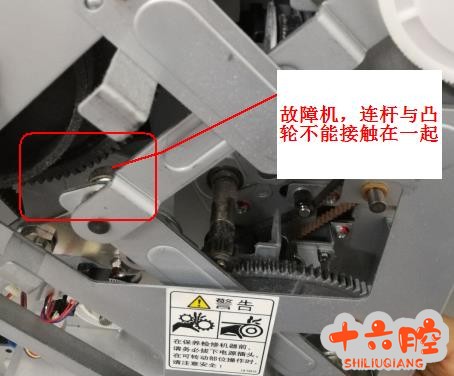
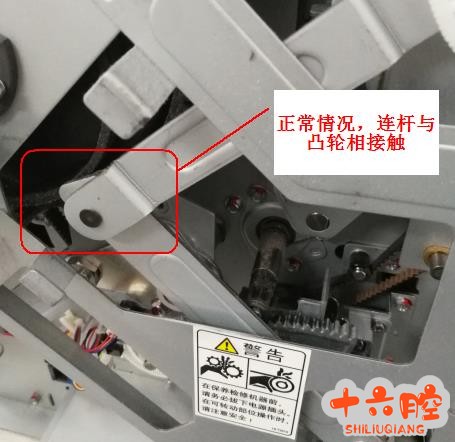
3. Open the back cover and observe the paper feeding process. It was found that the timing roller drive link was not reset, causing the timing roller to not rotate when the main motor rotates;
4. After cleaning the timing roller drive bearing and drive connecting rod, the timing roller drive connecting rod resumed normal operation and the machine paper jam problem was resolved; Solution After using the machine for a period of time, there are more paper scraps and oil stains, which cause the timing roller drive link to fail to reset to the cam, resulting in paper jams. |
Address of this article:https://073868.com/post/5379.html
Copyright Notice:
For relevant infringements, reports, complaints and suggestions, please send E-mail:weixiuwang68@qq.com
Tags: #alignment roll #Paper jam #5450 #5440






