
|
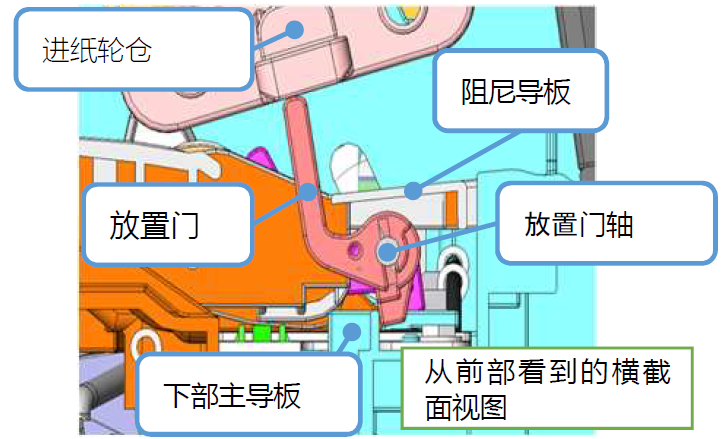
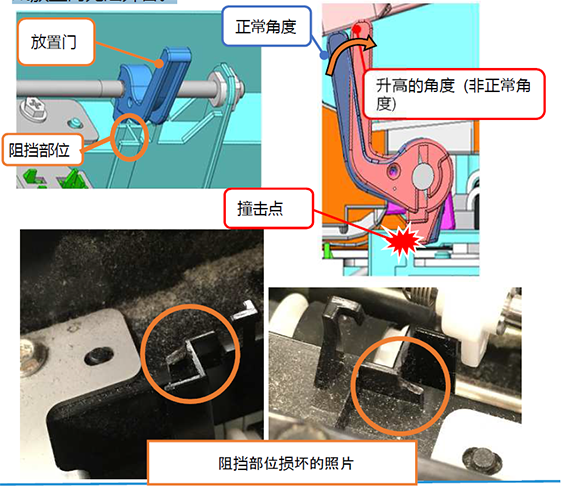
ApeosPort/OcocuCentre VII C7773/6673/5573/4473/3733/3372/2273 Error code 005-121 Measures to deal with paper jams Summary: Equipped with the DADF-130 ApeosPort/OcocuCentral-VII C7773/6673/5573/4473/3373/3372/2273 series machines, the paper jam fault of 005-121 often occurs. The reason is that the placement door did not move during paper feeding. This TI mainly introduces how to respond. Fault phenomenon: The placement door does not move when the original document is fed in, and the original document cannot be imported. Therefore, the DADF output sensor will not be triggered, causing the machine to report error codes 005-121. The following two stages explain the reasons why the placement door does not move: [Phase 1] The door shaft is bent due to the reaction force of the torque limiter. Placing the door will raise it to a higher angle than its normal position. This increases the axial torque required to move the placement door. Make it difficult to open and close At the same time, if the surface of the door and the feed wheel compartment comes into contact and wears, it will generate wear force, which further increases frictional resistance and contact arm torque.
[Phase 2] The lower main board has a blocking shape, which limits the angle at which the door can be placed. In the first stage, placing the door and blocking parts will collide multiple times, causing fatigue damage to the contact points. Placing the door will increase the angle compared to normal, and the axial torque required for the door to move will also increase. Causing the placement door to fail to open and close.
|
Address of this article:https://073868.com/post/5065.html
Copyright Notice:
For relevant infringements, reports, complaints and suggestions, please send E-mail:weixiuwang68@qq.com







