
|
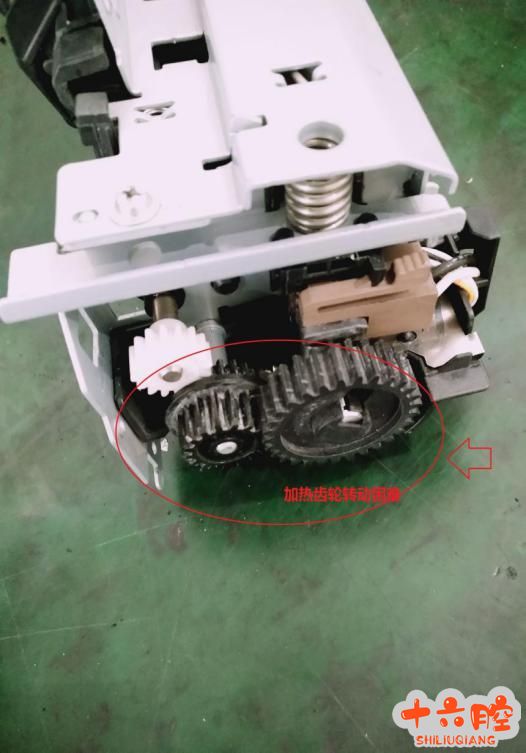
Fault Description: The M701N computer printing and offline printing panel prompts that the document is being printed, but the machine has no response. Resolution process: The machine cannot print normally even when offline, ruling out the problem on the computer side. After priority initialization, the same situation was found. After checking that all sensors of the machine were normal, double-sided printing and paper box were added. Removing double-sided printing and paper box offline printing also caused the same situation. Considering that the machine can function normally, but there is no response during the printing process, it is suspected that the motherboard and DC are faulty. A machine was found at the customer's site and the motherboard was disassembled, DC, The same situation applies to power board testing, where the fault point can only be re identified. When removing the back cover, it was found that the two screws fixing the back cover of the machine had fallen off. It was judged that the machine must have been disassembled. After opening the back cover to shield the back cover sensor and starting the self check, it was found that the heating component stopped rotating after less than 2 seconds. Under normal circumstances, the machine stopped rotating after self checking the heating component. Currently, it is suspected that the problem lies in the heating component, and only the heating component can be removed for observation. After removing the heating component, it was found that the fixing film was damaged, and the resistance of manually rotating the pressure roller gear was very high. After observing the heating gear set on the machine, it was found that there was no wear. The heating component was replaced first for testing, and the fault was resolved. In the final test, it was found that the printer was unable to print due to the gear on the heating component not rotating properly.
Share summary: During maintenance, any malfunctions must be carefully checked. If there are no error codes, it is best to troubleshoot the relevant hardware. |
Address of this article:https://073868.com/post/5042.html
Copyright Notice:
For relevant infringements, reports, complaints and suggestions, please send E-mail:weixiuwang68@qq.com
Tags: #M701N #M701 #Printing document #Power board #Motherboard







