
|
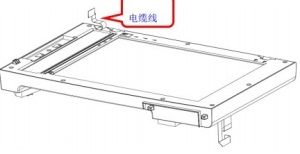
Fault phenomenon: 1) When the ADF is supposed to feed, but the ADF pick up wheel does not have any pick up action, causing the ADF to not load paper. 2) ADF can handle paper, but the all-in-one machine does not have any printing or fax operations. 3) There is paper on the ADF, but the all-in-one machine cannot detect it. 4) ADF continuously loads paper. Solution Inspection and troubleshooting methods: Firstly, confirm that the fault phenomenon can be reproduced. If the adjustment cannot solve the problem, it is necessary to apply for spare parts for maintenance. It is recommended to first apply for scanning components. In depth analysis: The above fault is an electronic fault (electronic signal problem), not a mechanical fault. According to the investigation, it was found that if there is a defect in the cable on the scanning component (as shown in the figure below), it will cause the above-mentioned fault phenomenon. Therefore, replacing the cable can solve the problem. 2. However, HP does not have a separate spare cable, which is attached to the scanning component. Therefore, it is necessary to apply for scanning components. 3. Please note: Do not apply for ADF components to solve the above problems.
|
Address of this article:https://073868.com/post/4969.html
Copyright Notice:
For relevant infringements, reports, complaints and suggestions, please send E-mail:weixiuwang68@qq.com
Tags: #M1536 #CM1415 #M175 #No paper feed







