
|
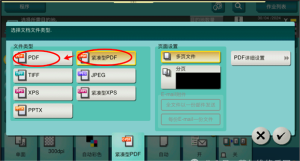
Fault phenomenon: Scanning a small number of original documents or a few original documents will prompt insufficient memory, and the task will be deleted Reason: Our MFP's default file type setting for scanning is Compact PDF, which means that the PDF format needs to be compressed into a compact PDF with a smaller file size, resulting in excessive CPU and memory consumption Solution: Change the default format of the scanned file to PDF (Machine Settings - User Settings - Scan Settings - Default Scan Settings - Current Settings)
|
Address of this article:https://073868.com/post/4960.html
Copyright Notice:
For relevant infringements, reports, complaints and suggestions, please send E-mail:weixiuwang68@qq.com
Tags: #Out of memory #C226 #Scan #Compact PDF #PDF







