
|
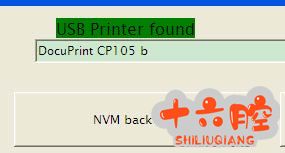
Fault phenomenon: Due to the use of third-party substitute chips, some machines may encounter situations where toner is not recognized, mostly yellow toner is not recognized. After the contact point spring of the toner detection on the machine is completed, replacing the original toner is ineffective. Solution: Repair stations can prepare their own motherboards or apply for test motherboards. Option 1: Bring your own motherboard According to the model of the machine being repaired, prepare a printable CP105 or CP205 (the two models of motherboards are not compatible), print the configuration page, and record the firmware and engine versions of the normal machine. 1. Backup the normal machine engine board data to the motherboard, open the NVM tool "MarkingUnitReplaced Tool", click the "NVM Backup button", wait for about 15 seconds or more after running, and then shut down.
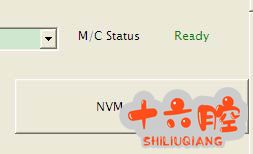
2. Remove the motherboard from the normal machine and replace it with the faulty machine. 3. Turn on the power supply of the faulty machine, connect it online (with the back cover closed), run the "MarkingUnitReplaced Tool" tool, click the "NVM Restore button", and wait for about 15 seconds or more after running. At this time, the majority of the machine motors will automatically run and return to normal, and a small number of machines may light up a red light (note that the fault is not due to toner failure)
4. Shut down and restore the motherboard (install the faulty machine motherboard back onto the faulty machine). 5. Power on and the machine returns to normal. At this time, the machine will turn on with a red light and an online error message of "24-340". Please follow step 6 below 6. Shut down, wait for more than 20 seconds, turn on, some machines will function normally. If the fault persists, please follow these steps. 7. Use the "Printer Utility Setup" to view the machine firmware and engine version, and upgrade to a more advanced version of the firmware. Link:https://pan.baidu.com/s/1R1gAbgonFHpdFzMR6qaPKQ Extraction code: djxo |
Address of this article:https://073868.com/post/4953.html
Copyright Notice:
For relevant infringements, reports, complaints and suggestions, please send E-mail:weixiuwang68@qq.com
Tags: #CP205 #CP105 #Ink powder not recognized







