
|
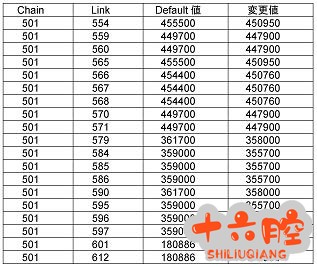
Topic: About changing the fixing speed to solve the problem of color overprinting deviation 1. Overview In order to prevent the occurrence of various color overprinting problems on the Versant 2100 Press (V2100P) device, the solution is to change the Fuser speed for release 2. Content We have recently received reports of various color overprinting issues with coated paper from customer sites. This issue mainly occurs in the following paper specifications: 157gsm,220gsm,230gsm,260gsm; But other types of paper may also be affected. The reason for this problem is that the printing paper has poor deflection at the fixing point, and the fixing process tends to stretch the paper. TI has made corrections to the Fuser speed parameters corresponding to different thicknesses of paper this time. Please make NVM changes according to the Chain Link table on the right. Attention 1) Please make sure to make this change on all V2100P devices; 2) This TI is also applicable to the issue of color overprinting on other thicknesses of paper caused by the fixing speed; 3) Due to the difference in design between V80 and V2100P, this TI is not applicable. List of Chain Link related to V2100P color overlay offset issues
|
Address of this article:https://073868.com/post/4926.html
Copyright Notice:
For relevant infringements, reports, complaints and suggestions, please send E-mail:weixiuwang68@qq.com







