
|
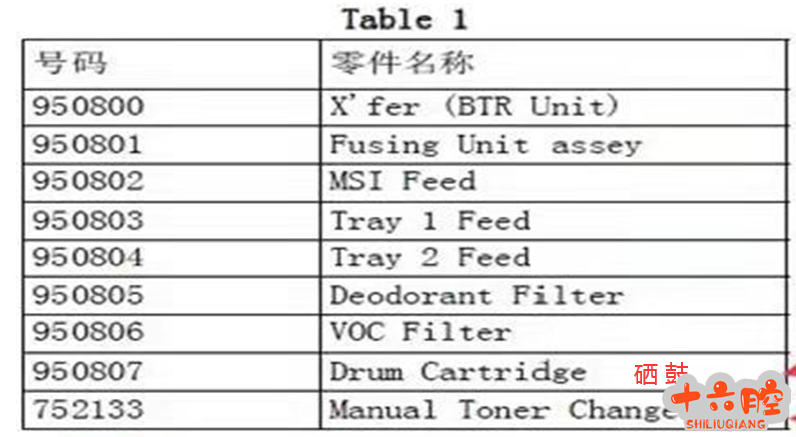
Purpose: Only for regular replacement parts that can be replaced by users, providing the function of initializing HFSI counters and replacing flag flags in machine administrator mode. When the lifespan of the toner cartridge and toner expires, the machine panel light will turn on, indicating the need to replace the toner cartridge or toner. Before clearing the alarm prompt according to the following steps, please replace the original toner cartridge or toner before performing the following operations to prevent machine failure caused by the expiration of consumables. Steps: 1. Enter machine administrator mode.(1) Long press<认证>Press the key for more than 4 seconds.(2) Enter password using numeric keypad<11111>Then press<启动>Key2. Enter [8000] press<启动>Press the key to enter maintenance mode.
After successful clearing, [End] flashes twice and returns to the program code input screen. 5. Exit the machine administrator shortcut. (1) Press<认证>The key. After clearing any of the above components, the machine will automatically restart when exiting administrator mode. |
Address of this article:https://073868.com/post/4883.html
Copyright Notice:
For relevant infringements, reports, complaints and suggestions, please send E-mail:weixiuwang68@qq.com
Tags: #2350 #Toner cartridge #Toner cartridge #HFSI counter #Carbon powder lifespan







