
|
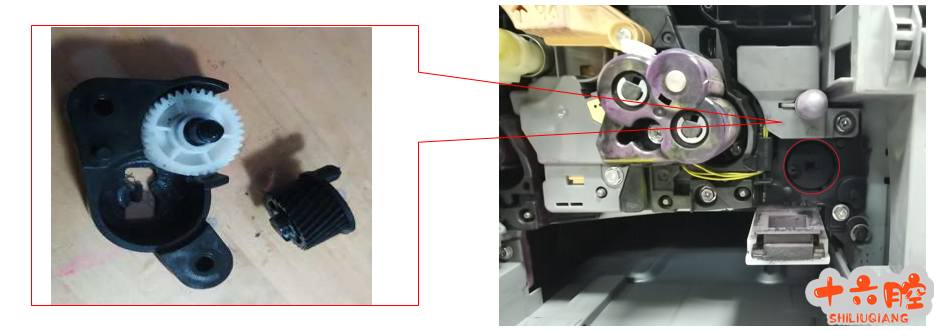
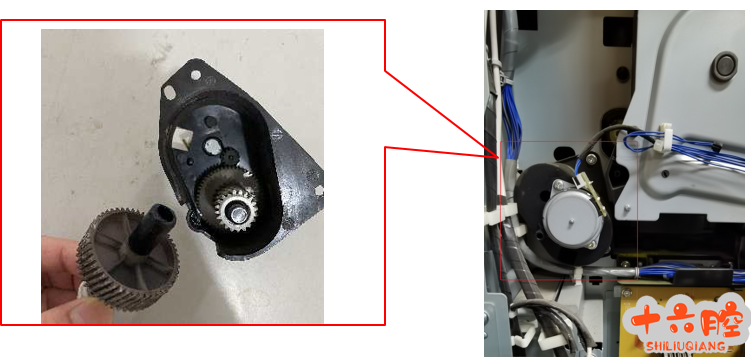
Fault phenomenon: Fuji Xerox-VI2271, VII 2273, APC3070 series machine users print more waste powder when red heads are the main ones.Solution:1. Clean the toner inside the machine and on the toner cartridge, and check whether the waste powder transmission gear on the selenium is damaged2. Enter maintenance mode, component control, IO inspection, and enter code 091-006 to determine whether there is abnormal noise in the waste powder recovery channel of the machine. This fault is often caused by damage to the waste powder box drive, resulting in poor waste powder recovery of the whole machine.3, check whether the waste powder transmission component gear can rotate normally, and management of internal waste powder4. Remove the waste powder box and check whether the gear set at the front of the machine is damaged, as shown in the figure
|
Address of this article:https://073868.com/post/4684.html
Copyright Notice:
For relevant infringements, reports, complaints and suggestions, please send E-mail:weixiuwang68@qq.com
Tags: #C3070 #More waste powder #C2271 #C2273 #waste powder transmission gear







