
|
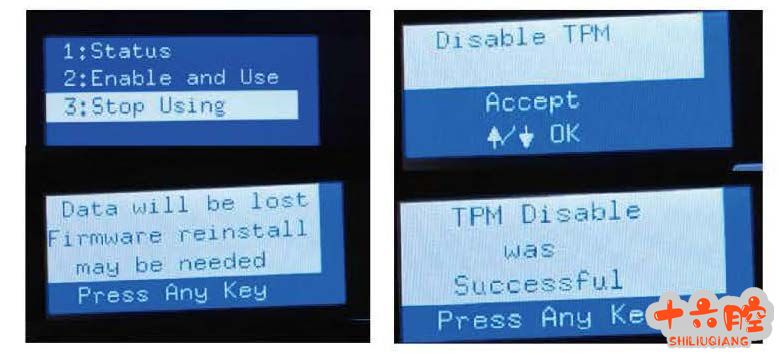
Problem description: After power on self-test, error "81.09.00" was reported. Attempted to execute particle clean and format disk in the proboot menu to upgrade the firmware, but none of them worked Toubleshooting : 1 . Keep the machine in a bare metal state, restart the machine, and see if it can be restored to ready If not, follow the instructions below to turn off and then turn on the TPM function again Description: This error handling procedure applies to all printers with embedded TPM modules that use firmware firmware.
Root Cause: This error is referred to as a network card failure on the motherboard in some product CPMD manuals, but according to factory recommendations, the priority for troubleshooting is TPM, so the cause of this problem is TPM first. |
Address of this article:https://073868.com/post/4774.html
Copyright Notice:
For relevant infringements, reports, complaints and suggestions, please send E-mail:weixiuwang68@qq.com
Tags: #Futuresmart #Firmware #HP printer







