
|
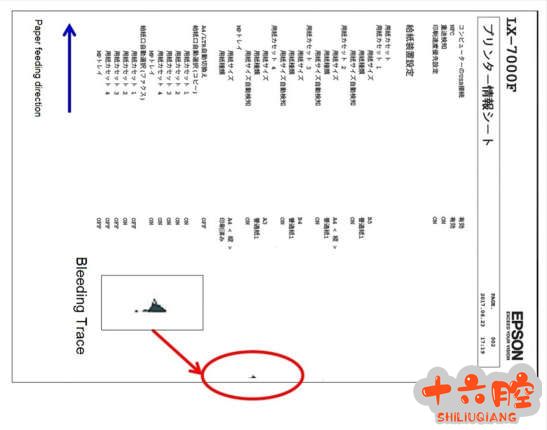
1. Problem content The following phenomenon depends on the type of paper 1) Rubbing Ink
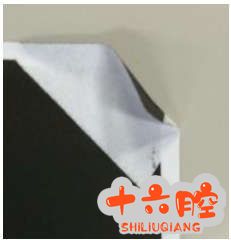
2) Fold angle
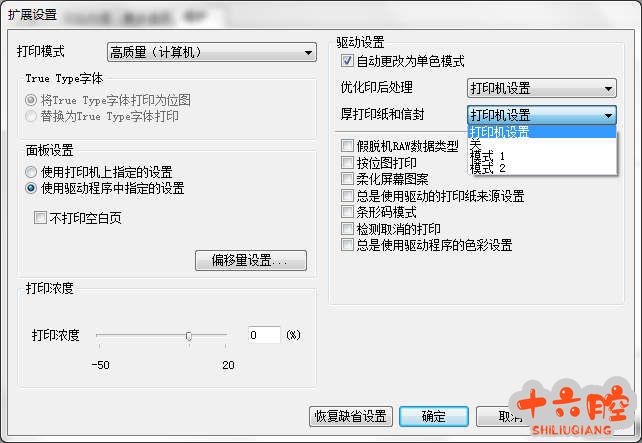
2. Countermeasures -Firstly, check and clean the paper path -Upgrade the firmware program to GA12H7 or a later version (T/I No. TE17-0309) -If the fault occurs again, Please use the "thick printing paper and envelope" function in the driver to prevent this phenomenon This mode can be set through the printer panel or printer driver Note: This feature has two modes: Mode 1 and Mode 2 Printer driver interface:
3. Printing speed in "thick printing paper and envelope" mode Mode 1 printing speed is the same as normal mode Mode 2 printing speed slightly reduced |
Address of this article:https://073868.com/post/4717.html
Copyright Notice:
For relevant infringements, reports, complaints and suggestions, please send E-mail:weixiuwang68@qq.com
Tags: #WF-C20590a #WF-17590a #Rubbing Ink #At the corner #17590a







