
|
Fault phenomenon: After booting up, the "ShutDown" screen in Figure 1 appears, and the machine will automatically shut down and restart. After restarting, it seems to enter the desktop normally, but only the "Direct Connection" APP icon in Figure 2, which can be scrolled left and right. At this time, maintenance mode cannot be entered, and the scanning rack has normal operation and lights up. After a while, Figure 3 will prompt that the hard drive cannot be used, and a few minutes later, Figure 4 SC672-11 maintenance code will appear.
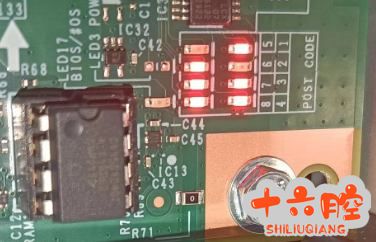
Processing procedure: Check that the controller LED lights up at rest as shown in the figure below, without a normal 1-second interval flashing Solution: The machine works normally after replacing the controller board |
Address of this article:https://073868.com/post/1192.html
Copyright Notice:
For relevant infringements, reports, complaints and suggestions, please send E-mail:weixiuwang68@qq.com
Tags: #C672-11 #ShutDown #Controller board #2500 #5000






