
|
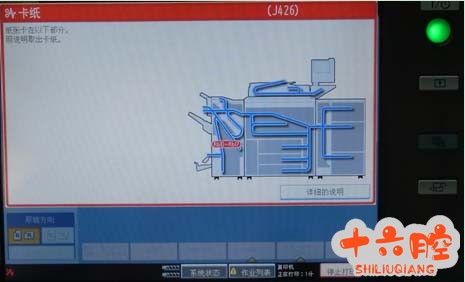
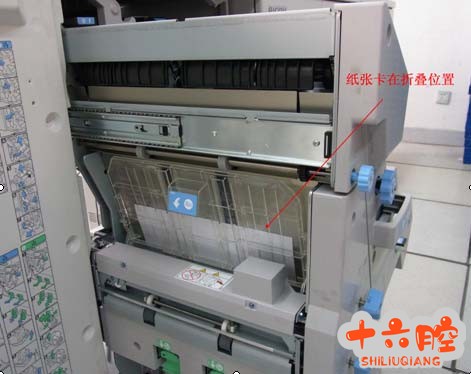
Symptoms When copying and printing, use the booklet folding and binding mode. The first bound part can be printed normally, and when the second folded part is about to be folded, it will prompt Rb10~Rb17 paper jam with jam code J426, as shown in the following figure. After removing the paper card, it prompts SC766 after resetting. Turning off the power can reset this code.
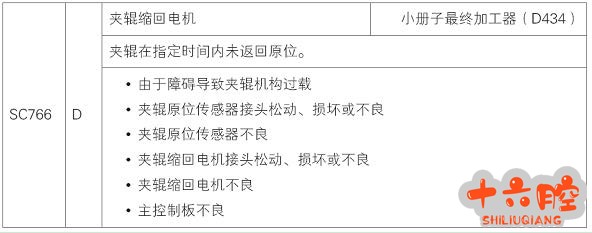
Reason Refer to SC766 and see the following instructions:
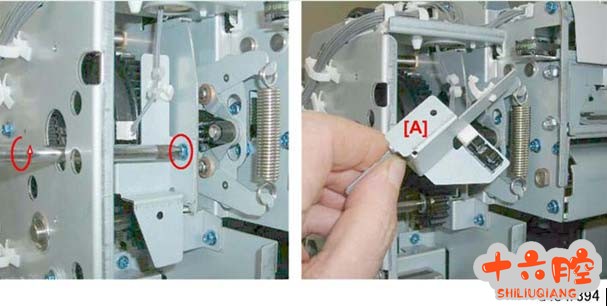
Analyze the possible faults in the above positions, check the clamp mechanism and folding roller mechanism, no abnormalities found, replace the folding roller cam in-situ sensor, replace the clamp in-situ sensor, replace the folding plate in-situ sensor, and test the folding roller motor up and down. The fault still persists. Replace the side panel sensor of the booklet folding device, replace the in-situ sensor of the booklet bottom panel, replace the in-situ sensor of the clamp, and check the clamp retraction motor. No abnormalities were found. Replace the folding roller cam in-situ sensor:
Finally, upgrade the host system firmware to V2.05, engine firmware to V1.11, stapler firmware to V3.140, lubricate the clamping roller guide rail for testing folding and binding, and the fault disappeared. Link: https://pan.baidu.com/s/1VscyBFpX4gFvm6NznT68IA Extraction code: e3ms Solution Upgrade the host system and engine firmware, upgrade the stapler firmware, and lubricate the clamping roller guide rail. |
Address of this article:https://073868.com/post/3177.html
Copyright Notice:
For relevant infringements, reports, complaints and suggestions, please send E-mail:weixiuwang68@qq.com







