
|
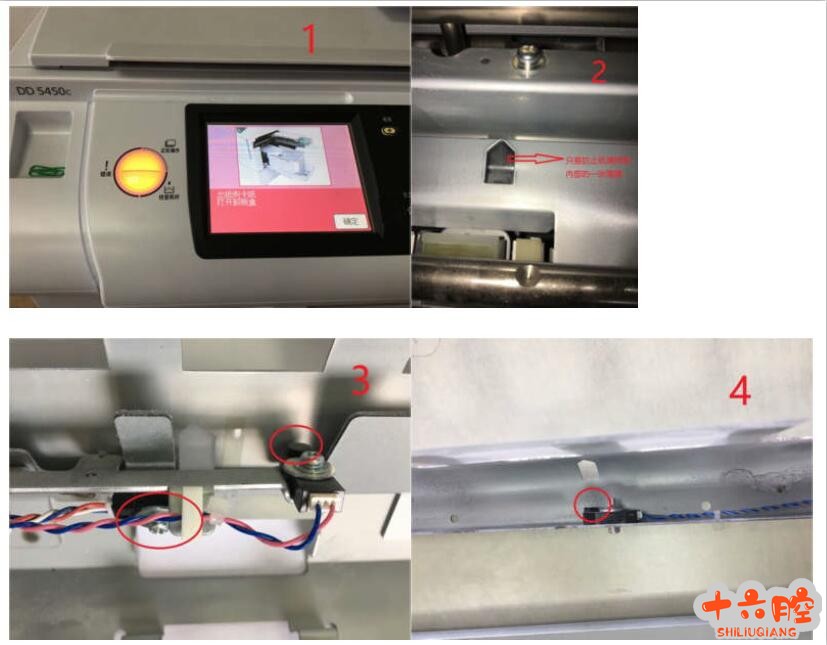
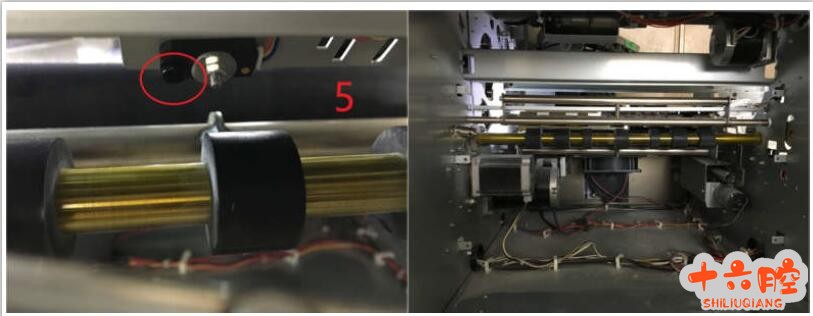
Maintenance process: The user of this machine is a school, and it is mainly used for printing test papers. The paper used is A3 size 70g double glue oil printing paper, and no such malfunction has occurred on another DD5450. According to the user's description, the maximum speed printing starts after plate making, but there is a random occurrence of paper jams. However, upon inspection, there is no paper jam inside the machine. After removing all the paper from the feeding table and placing it again, the error message disappears and printing can continue, but random paper jams will appear again. After arriving at the site for the first time, remove the two paper feeding and rubbing wheels on the operator's side, and use a wrung out cloth to wipe the detection paper feeding sensor near the rubbing wheels. Use a blowing balloon to blow its surface and test the continuous output of 500 pages before leaving. A few days later, I received a call from a user claiming that there was a random paper jam. After arriving at the user's site again, it was found that the detection paper feed sensor used in this model of machine was different from the previous generation machine. It used a set of sensors that work simultaneously (emitting and receiving light respectively). The front panel and rear panel were removed, and the entire paper feed alignment sensor bracket was removed to clean the surface paper powder of the sensor (as shown in Figures 3, 4, and 5). After reverse installation, the previous fault phenomenon did not occur again after testing and printing 5000 pages.
Repair experience: 1. Later, it was discovered that the "paper top detection sensor" and the "dual paper feed detection sensor" were working together (emitting and receiving light, respectively), and that the surface of the "paper top detection sensor" hole was only a transparent film adhered to the surface to prevent dust from falling onto the sensor surface below the hole. 2. The process of cleaning the above two sets of sensors for this model of printing machine is quite complicated, requiring the removal of too many components, otherwise it cannot be completely cleaned.
|
Address of this article:https://073868.com/post/3141.html
Copyright Notice:
For relevant infringements, reports, complaints and suggestions, please send E-mail:weixiuwang68@qq.com
Tags: #5450 #Paper jam #Open the unloading box







