
|
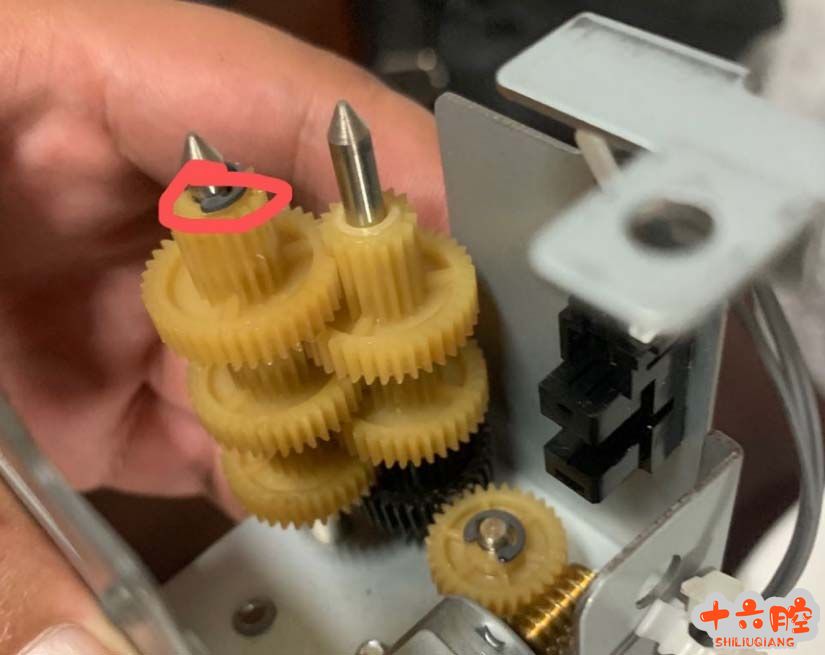
Symptoms Fault: IM 7000 starts up normally, but when printed, it reports SC540-03. Maintenance process 1. Check the maintenance manual to confirm that the fault code is caused by the fixing cleaning paper motor. No other error messages were found in the SC history record of SP7403. It was confirmed that there is only one fault code, which refers to abnormal rotation of the cleaning paper unit. 2. After executing SP5810, restart the machine and perform a printing test. If the error persists, it indicates that the fault is still in the fixing and cleaning unit. 3. As there were no parts available for replacement testing on site, the fixing and cleaning unit was directly removed for inspection. First, the driving components of the cleaning unit were removed, and then the cleaning unit was manually rotated normally without any operational issues. 4. Manually rotate the cleaning paper gear component and find difficulty in rotation, indicating that the fault is caused by the driving component of the cleaning unit. 5. Continue to disassemble the gears in the gear set and check one by one whether it is caused by damage to a single or multiple gears. After removing the fixed retaining spring, when manually rotating the drive component, it was found that there was no significant resistance before and it could rotate normally, indicating that the fault may be due to deformation of the bracket causing slight deviation in the gear meshing position, resulting in high rotational resistance and error reporting.
6. Due to the lack of parts replacement on site and the inability to visually determine the angle of bracket deformation, the gear behind the snap spring in the diagram was removed, and the corresponding snap spring section was ground off by about 1mm. After reinstalling the snap spring, the drive components were manually rotated to clean and operate normally. After installing the manually processed components on the machine, testing has been normal until now, and the fault has been resolved. Solution The above solution to the malfunction is due to the lack of parts replacement on site, and manual adjustment was adopted. The cause of the malfunction is still due to the deformation of the cleaning drive gear bracket, which causes the cleaning paper motor to run under excessive load and report an error. If possible, it is recommended to replace this bracket for troubleshooting. |
Address of this article:https://073868.com/post/3135.html
Copyright Notice:
For relevant infringements, reports, complaints and suggestions, please send E-mail:weixiuwang68@qq.com
Tags: #SC540-03 #7000 #Cleaning paper gears #Fuser





