
|
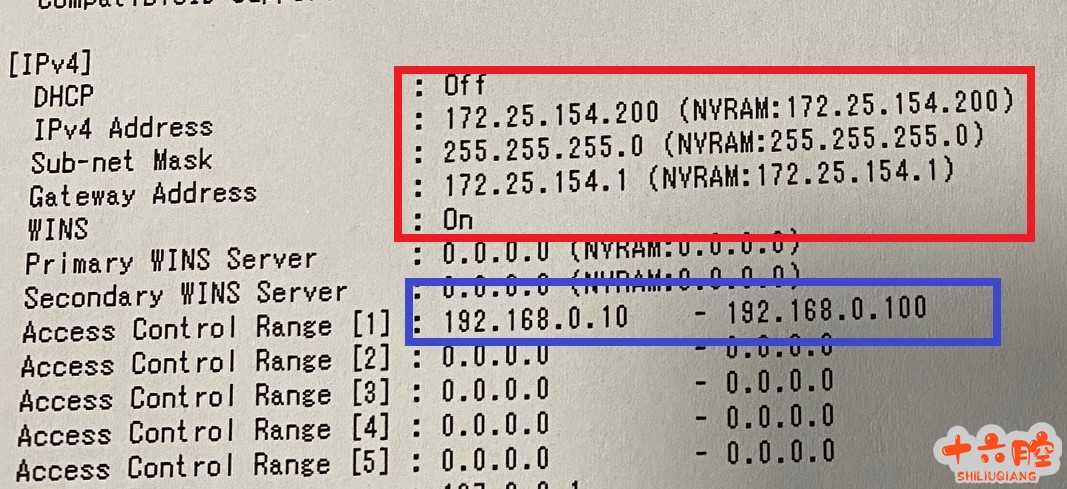
Symptoms MP5055SP, The computer can ping the machine, but it cannot print (the machine is unresponsive). Cause analysis 1. Reinstalling and replacing the print driver, replacing the computer, or using a computer directly connected to the machine cannot solve the problem. 2. When accessing the machine through a browser, the message '403 Forbidden' appears. 3. Use SP5-990-7 to print the "NIB Summary" to check network interface related information. It was found that the machine has set an access control range (as indicated by the blue box in Figure 1), but the machine's IP address (as indicated by the red box in Figure 1) is not within the access range.
Figure 1 Solution 1. Set the machine IP and computer IP to the network segment marked in blue. 2. Access the machine through a computer browser and log in as the machine administrator. 3. Device Management - Configuration - Security - Access Control - IPv4 Access Control Scope. Delete the IP within the blue box, confirm and turn off/on. 4. Reconfigure the machine and customer computer IP according to customer needs, and they can be used normally. |
Address of this article:https://073868.com/post/3104.html
Copyright Notice:
For relevant infringements, reports, complaints and suggestions, please send E-mail:weixiuwang68@qq.com
Tags: #5055 #Unable to print







