
|
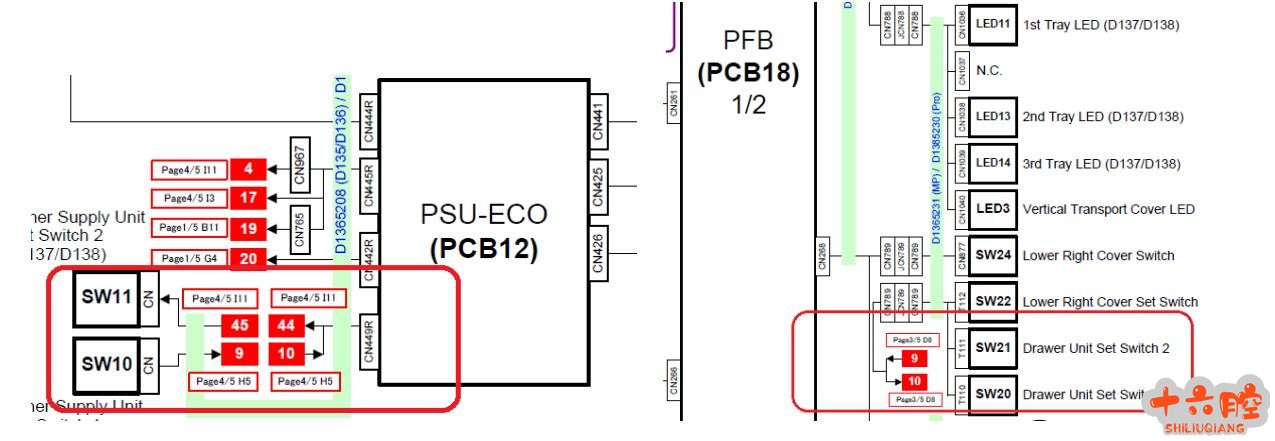
SymptomsFault: Always Alam "Please Close the Drawer Unit" Always reporting 'Close drawer unit'Reason1. Drawer Knob Sensor、Drawer Set Sensor、Drawer Lock Sensor、Drawer Lock Moter defective。Drawer rotation sensor, drawer placement sensor, drawer locking sensor, drawer locking motor malfunction.2. DUB、PFB、IOB defective。DUB, PFB, IOB faults.3. Communication (Input/Output to PCB) defective。Connection failure between input/output device and PCB. Maintenance process 1. Using SP5803 to detected Drawer Knob Sensor、Drawer Set Sensor、Drawer Lock Sensor,they were normal;Use SP5803 to test that the drawer rotation sensor, drawer placement sensor, drawer locking sensor, and drawer locking motor are all functioning properly;2. Using SP5804、1040 to detected Drawer Lock Moter, its normal also;Using SP5804 and 1040 to test the drawer locking motor is also normal;3. Repalced DUB、PFB、IOB one by one,Failure still;After sequentially replacing DUB, PFB, and IOB, the fault was not resolved;4. I found out Drawer Unit Set Switch1\2 on the framework from the PtoP Diagram,but they were not found in SP5803;According to PtoP data, it was found that there are drawer units on the rack that are related to switches 1 and 2, but this test item was not found in the SP5803 list;
|
Address of this article:https://073868.com/post/3011.html
Copyright Notice:
For relevant infringements, reports, complaints and suggestions, please send E-mail:weixiuwang68@qq.com
Tags: #6502 #8002 #Close drawer unit #Switch







