
|
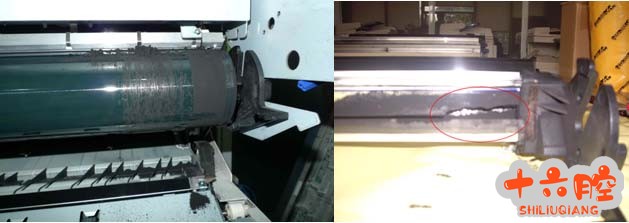
Symptoms Black lines appear on the photocopy Reason The OPC drum was scratched and one end of the cleaning scraper was damaged. (See the figure below)
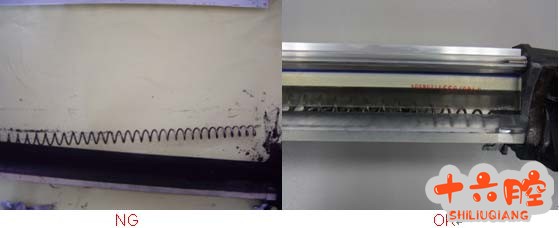
Maintenance process: 1. It was found on site that the right end of the OPC drum had been dislodged by the stirring spring rod in the recycling section, resulting in serious damage to the cleaning scraper, recycling seal, and drum. 2. After cleaning the recycling section, it was found that some of the small paper scraps in the waste powder recycling of the machine caused blockage of the waste powder, resulting in a 2-3CM reduction in the force on the stirring spring rod, which then caused the recycling stirring spring to come out of the waste powder bin. (See the figure below)
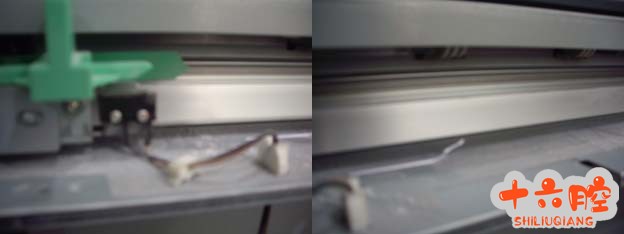
3. Disassembling the cutting blade unit of the roll paper unit, it was found that there were obvious long and small paper scraps on the guide plate of the unit. It is preliminarily judged that the blockage of waste powder is caused by poor PM of the cutting blade unit of the roll paper unit. (See the small paper scraps of the cutting blade unit in the figure below) Solution Replace the OPC drum with a new one, clean the scraper, and replace the recycled mixing spring with a new one. Using different brands of paper can produce varying degrees of paper scraps and paper scraps. Technicians need to regularly clean and maintain the cutting blade unit according to the user's usage. If waste powder blockage and shortened mixing springs are found during the PM process, the recycling part needs to be cleaned immediately and a new mixing spring needs to be replaced.
|
Address of this article:https://073868.com/post/2969.html
Copyright Notice:
For relevant infringements, reports, complaints and suggestions, please send E-mail:weixiuwang68@qq.com







