
|
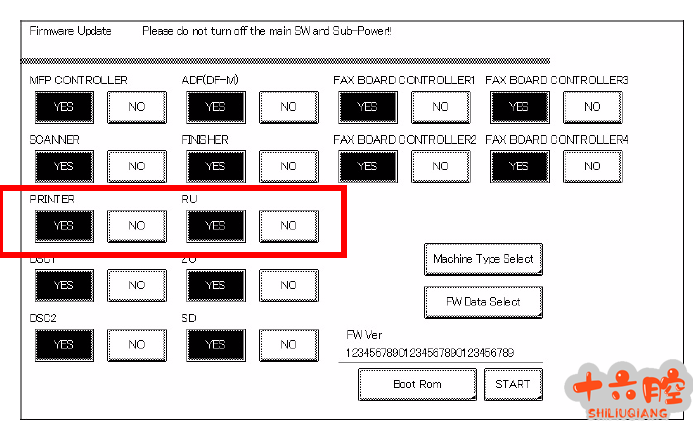
Fault phenomenon: When the machine is newly installed, it keeps restarting. The customer returns the machine and returns it to the warehouse. When replacing the SSD and upgrading the firmware after replacement, the MFPB section N.G Fault Analysis: 1. The firmware upgrade N.G. first considers replacing the firmware version for testing. This malfunction usually occurs after changing the hardware supplier, and the firmware version will be updated accordingly. 2. After replacing the firmware in this case, the fault still persists. Consider MFPB malfunction. 3. After replacing the MFPB with another normal machine, the machine started up normally. So they filed a claim for a new MFPB. 4. After installing the new MFPB and SSD, rewrite the firmware according to technical intelligence instructions, and the firmware upgrade will no longer show N.G. But when turned on, it stays on the two sail interfaces and cannot enter the standby interface, waiting for more than half an hour. 5. Upon rechecking the firmware upgrade process, it was found that only the MFPB, SCANNER, and ADF sections were displayed, while the PRIMER section was not
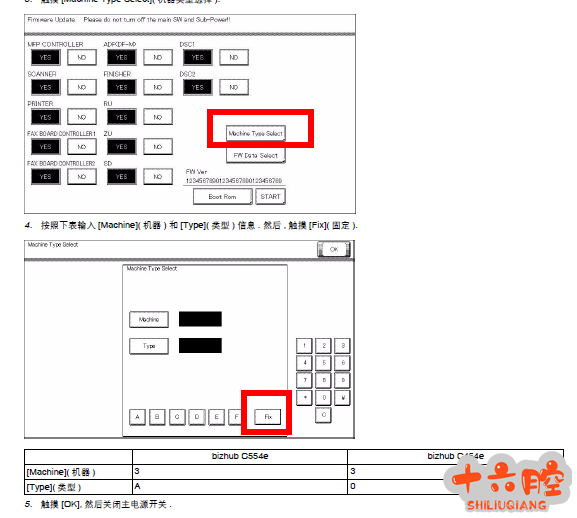
6. Resetting the machine type resulted in the PRINTER section appearing. After upgrading the firmware again, the machine finally started up normally.
Fault Summary: 1. If the e-series machine is not a newly imported machine, but has been stored in the warehouse for a long time since its launch, it is recommended to upgrade to the latest SSD firmware when installing to avoid continuous restart failures. 2. For e-series machines and C221 series, it is recommended to backup engine data as soon as possible after installation to avoid circuit board failures that cannot be repaired after replacement. 3. If either MFPB or SSD is replaced with a brand new one, the host firmware must be upgraded in order to boot up properly. When upgrading, pay attention to whether the machine type is set properly. |
Address of this article:https://073868.com/post/2853.html
Copyright Notice:
For relevant infringements, reports, complaints and suggestions, please send E-mail:weixiuwang68@qq.com







