
|
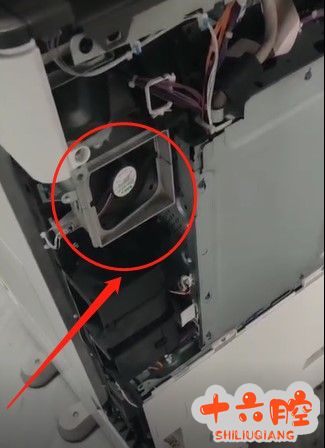
Symptoms: When an IMC3500 machine is copying or printing, it often makes abnormal noises, but the machine can be used normally. Reason: 1. The teeth of the fixing drive gear are worn, causing abnormal noise. 2. The fixing drive belt slips, causing gear driving problems. 3. Poor fixing and paper output motor leads to abnormal noise. 4. Poor fixing and cooling fan leads to abnormal noise. Maintenance process: 1 . On site, the standard speed of the 5-804-120 black developing motor was tested through SP mode output, and there was no abnormal noise 2. The standard speed of the color developing motor in. sp mode output 5-804-120 is normal and there is no abnormal noise 3. In. sp mode, the output of the 5-804-132 color drum motor is normal and there is no abnormal noise at the standard speed 4. SP mode output 5-804-136. The standard speed of the black drum motor is normal and there is no abnormal noise 5. SP mode output 5-804-140/141 ITB contact motor normal forward and reverse rotation without abnormal noise During the testing process, it was found that there was also abnormal noise when the machine was in standby mode. When the back cover of the machine was opened and the switch side door was opened, abnormal noise occurred. As shown in the red circle in the figure below, the cooling fan made abnormal noise. The problem was solved by replacing the cooling fan with a new one to eliminate the abnormal noise.
Solution: Replace with a new cooling fan component (FAN: MM80: 25MM: DC 2.16W: (FAN5) ID: AX640199 Troubleshooting |
Address of this article:https://073868.com/post/278.html
Copyright Notice:
For relevant infringements, reports, complaints and suggestions, please send E-mail:weixiuwang68@qq.com
Tags: #C3500 #C3000 #C6000 #Fan #Abnormal noise






