
|
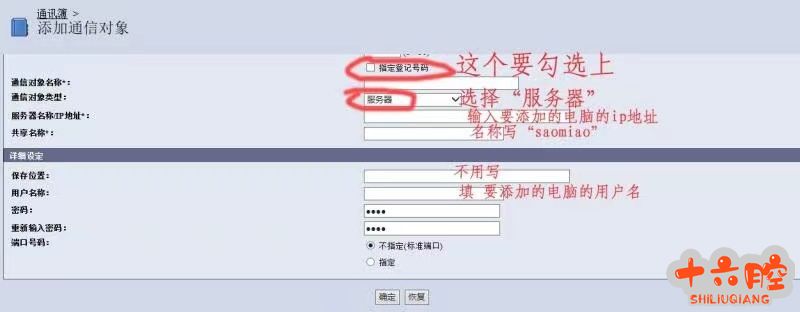
The customer has a Xerox printer that requires scanning function, but no matter how it is set up, it prompts scanning failure. After continuous exploration and Baidu's information, this problem was perfectly resolved 1. Create a folder with a random name (preferably using pinyin or simple letters) and grant Everyone permission to the folder. 2. Enable guest users who need to be scanned to the computer (password can be set or not, depending on personal habits) 3. Check if the printer port is 515 in the printer properties (this step is important. If it is not 515, the scanning port needs to be changed later. If it is 515, simply default it) 4. If the port seen in the printer properties is not 515, fill in the port number found in the port column. If it is 515 port, do not fill in it and select default.
|
Address of this article:https://073868.com/post/2647.html
Copyright Notice:
For relevant infringements, reports, complaints and suggestions, please send E-mail:weixiuwang68@qq.com
Tags: #2520 #Scan #Label error







