
|
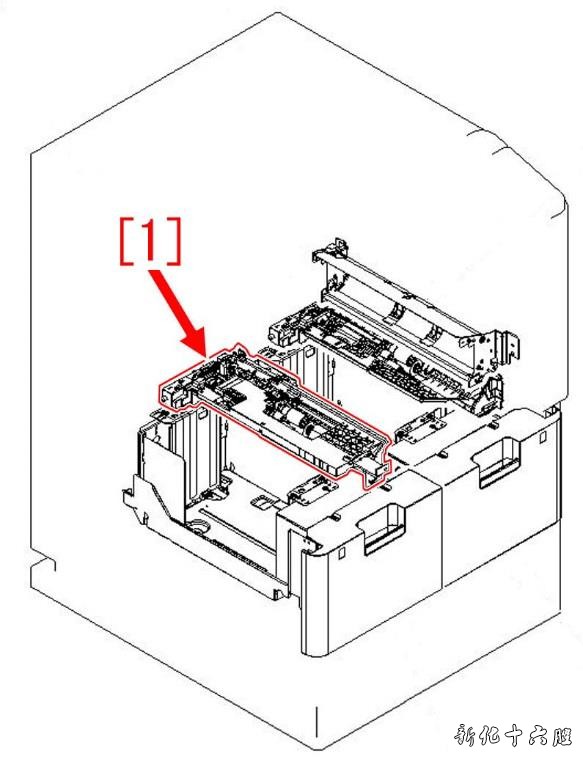
ImageRUNNER ADVANCE 6075 Series ImageRUNNER ADVANCE 6275 Series ImageRUNNER ADVANCE 6575 Series Fault phenomenon When clearing the paper jam around the rubbing component [1] on the left side of the paper bin, residual paper appeared at the rubbing position due to incomplete release of pressure from the rubbing wheel and separation wheel. When paper passes through, it may be torn apart, and sometimes paper fragments may remain inside.
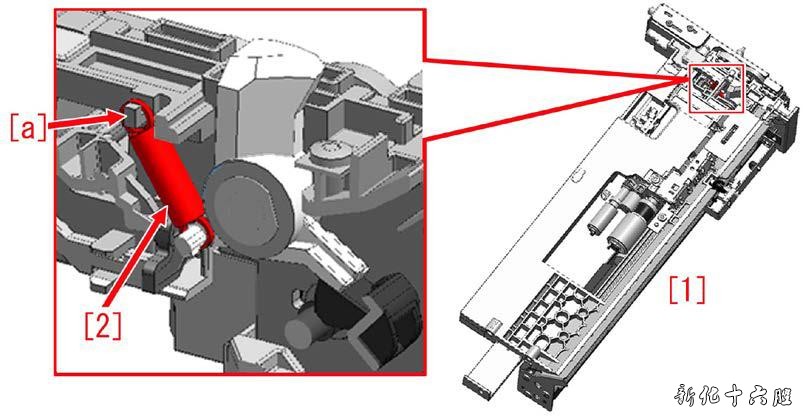
Cause of the failure Controlled by a torsion spring [2], release the pressure between the paper feeding roller and the separation roller of the left pick-up wheel [1]. If the protrusion [a] of the spring hook deforms, the spring pressure decreases, and it cannot move, the pressure between the paper feeding roller and the separation roller cannot be released. In this case, if the cardboard box is pulled out and the cardboard is removed, if the roller does not release the cardboard and it is caught in the middle, the cardboard will tear and remain inside the machine.
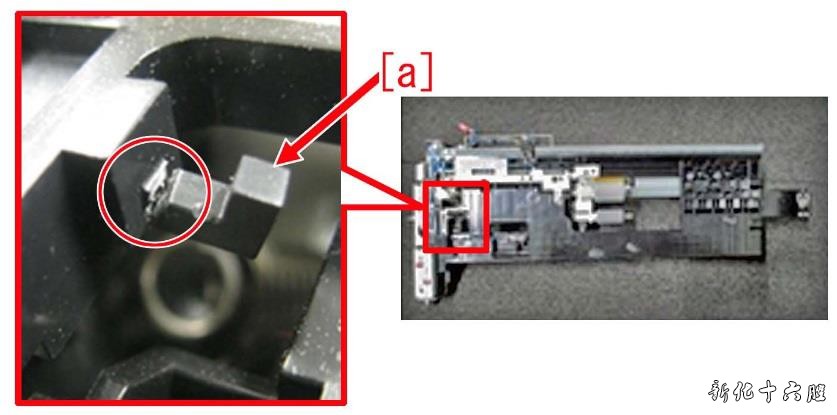
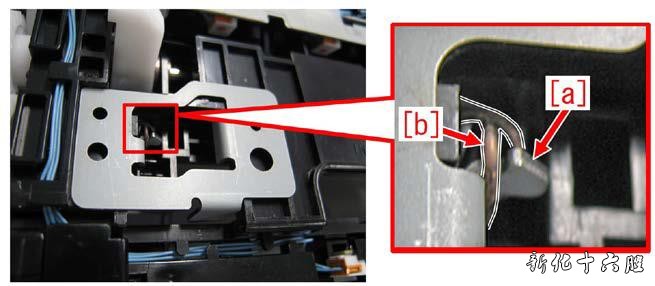
Maintenance work When paper frequently remains in the machine, due to the gap between the left paper bin and the paper rubbing part, remove the paper rubbing component and check the damage of the hook. If the hook is broken, prepare a new repair part, the spring support plate (FE2-C904-000), and install it according to the following instructions. If there is no damage, look for other factors. [Reference] The following photo shows the protruding part of the broken hook. If the damaged item has not been removed and looks like the photo [a], use pointed nose pliers to pull it off and continue working.
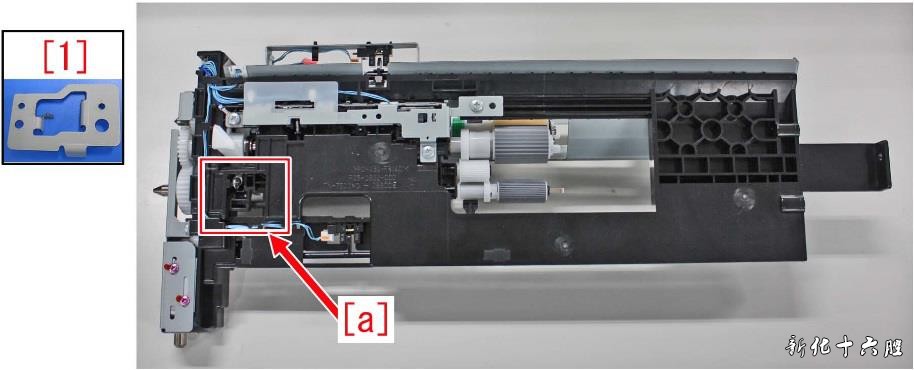
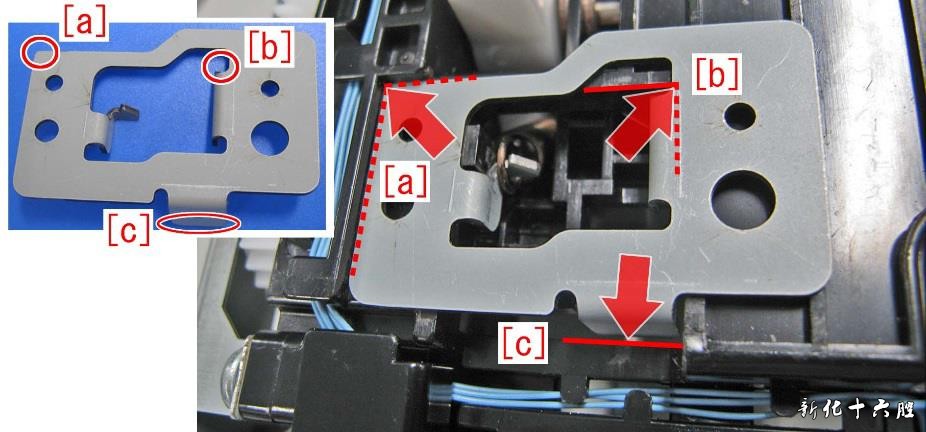
Maintenance work When paper frequently remains in the machine, due to the gap between the left paper bin and the paper rubbing part, remove the paper rubbing component and check the damage of the hook. If the hook is broken, prepare a new repair part, the spring support plate (FE2-C904-000), and install it according to the following instructions. If there is no damage, look for other factors. [Reference] The following photo shows the protruding part of the broken hook. If the damaged item has not been removed and looks like the photo [a], use pointed nose pliers to pull it off and continue working. 1) Remove the left paper bin rubbing component, refer to the following: Maintenance Manual>4. Parts Replacement and Cleaning>Paper Rubbing/Feeding System>Remove Left Paper Bin [Reference] In the maintenance manual, it is called the left paper compartment, not the left paper rubbing component. 2) Install the spring hook metal support plate (FE2-C904-000) [1] on the left paper bin rubbing assembly, please refer to the position in the following figure [a].
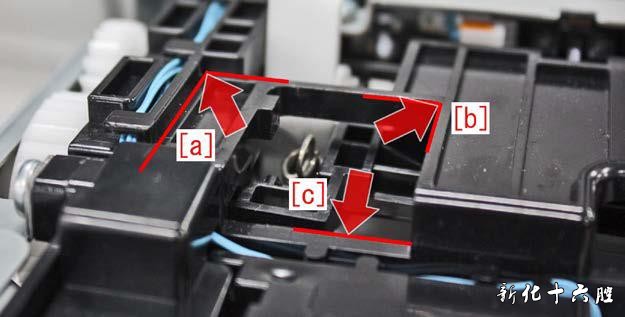
[Positioning reference] -Push the corner [a] of the spring support plate to the corner [a] position of the left paper rolling component; -Turn the corner of the spring support platePush to the left corner of the paper rubbing componentLocation; -Ensure that the spring bracket [c] is inside the frame [c] of the left paper rolling component, and ensure that it is not pressed onto the rack.
The following figure is a reference line. Remove the spring support plate from the paper rolling component on the left side for a clearer view.
3) Move the springHook onto the hook [a] of the spring support plate.
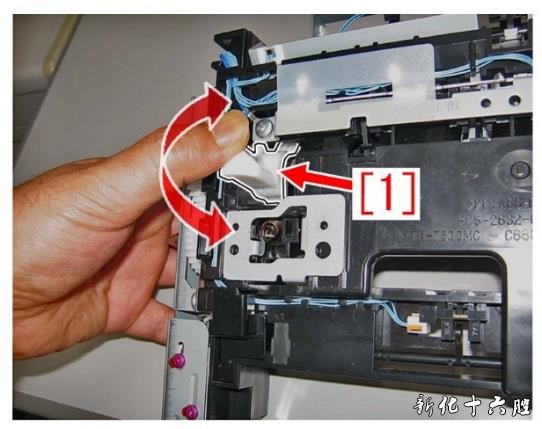
4) Check if the fixed/conveying release rod [1] is installed correctly and confirm that it can be reset normally.
5) Reinstall the left paper bin rubbing component back to the main unit. |
Address of this article:https://073868.com/post/2610.html
Copyright Notice:
For relevant infringements, reports, complaints and suggestions, please send E-mail:weixiuwang68@qq.com






