
|
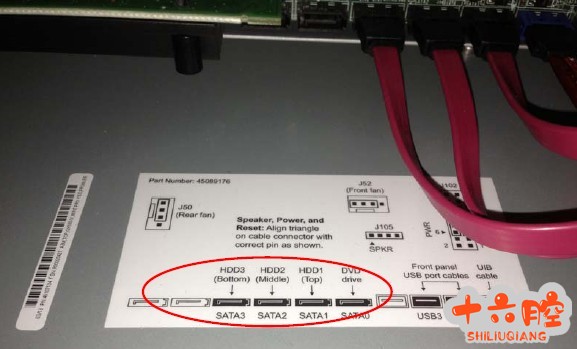
Product Model:Xerox C800/C1000 Topic:About EX1000 boot occasionally prompt "Not Found Opreater System" phenomenon. Fault phenomenon: After turning on the power of the EX1000 server, the display shows the "Not Found Opreater System" for the EX1000 boot prompt, which cannot enter the system. There is also a case where you can enter the system when you start up, but when you run any program, there is a high probability of unresponsive crash, blue screen or automatic restart. Cause of the failure: The EX1000 server has three SATA hard disks built in, 250G system hard disks and two 500G image cache hard disks from top to bottom. When the boot appears "Not When Found Opreater System ", the system hard disk will not be detected and displayed during the self-check process, but only the two 500G maps identified will be displayed. Like caching hard drives. Solution: 1. First, check whether the connection sequence of the three SATA hard disks is correct, as shown in the following figure:
2. Secondly, check whether the SATA connection of the hard disk is loose, resulting in poor contact. 3. Finally, check whether the system hard disk itself has bad track or abnormal noise. Bad roads in the hard disk will prevent the system from being reinstalled. What I encountered was that the hard disk had intermittent abnormal noise, which prevented the system from being reinstalled and replaced with a new system hard disk. After that, the system can be installed smoothly. |
Address of this article:https://073868.com/post/2516.html
Copyright Notice:
For relevant infringements, reports, complaints and suggestions, please send E-mail:weixiuwang68@qq.com







