
|
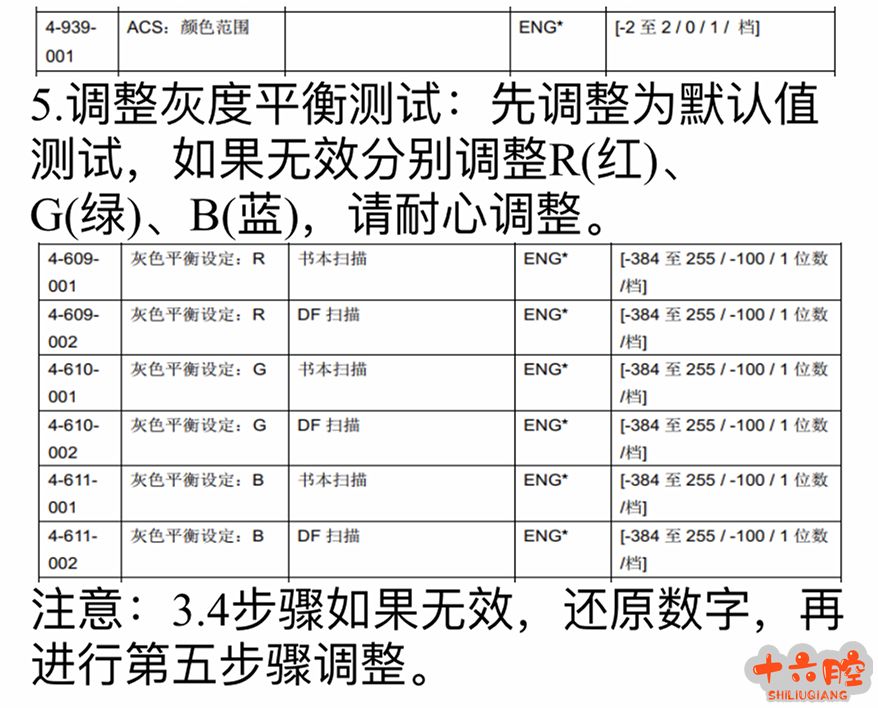
Copy or scan background blueadjustment method1. On the copy or scan interface, select 'Automatic Concentration' test 2. User Tools - Machine Features - Maintenance - Automatic Color Correction, Printing, and Scanning (All) 3. Adjust the background concentration in the user tool - copier features to the shallowest depth test. 4. Set SP4-939 to -1 or -2 for testing, which may be due to the high content of fluorescent whitening agents in the original paper causing the scanning system to recognize it as blue. Therefore, when using "automatic color selection" or color copying, the black and white original is copied as color. In addition, the ACS related options in User Tools>Machine Features>Copier Features>Color Adjustment can be lowered to two levels, with priority given to "black and white". Paper can be replaced for copying testing.
|
Address of this article:https://073868.com/post/203.html
Copyright Notice:
For relevant infringements, reports, complaints and suggestions, please send E-mail:weixiuwang68@qq.com






