
|
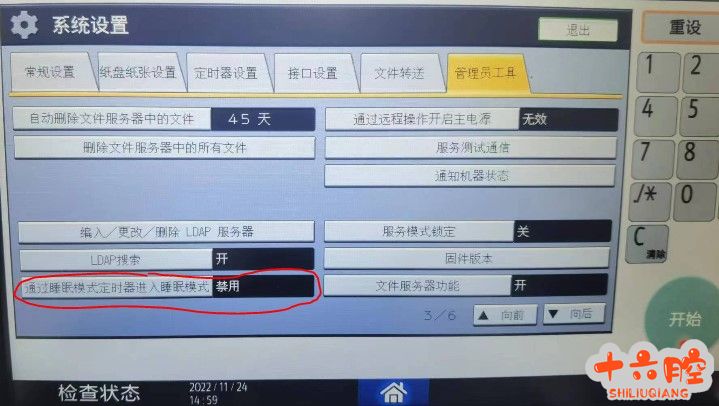
Symptoms A Ricoh IMC2500 cannot select energy-saving (sleep mode); System settings - Timer settings - Sleep mode cannot be modified Possible causes: Set up issues/controller malfunction/chip malfunction Maintenance process 1. Upon on-site inspection of the fault situation, it was found that the sleep mode timer was indeed grayed out in the system settings timer settings of the user tool and could not be adjusted; 3. Check if there are any settings in the administrator tool, and find that there is no place to set them; 4. After resetting the user tool to factory mode, the fault persists; 5. After performing SP5801 overall cleaning, the fault still persists; 6. After replacing both the controller board and EPPROM/NVRAM, the fault persists and cannot be set; 7. After modifying SP5305 to 1, it was found that the "Enter sleep mode through sleep mode timer" function button appeared in the administrator tool. After changing the default "disable" to "enable" and entering the timer settings again, it was found that the sleep mode timer had changed to an adjustable state. The fault was fixed; Set screenshot:
|
Address of this article:https://073868.com/post/164.html
Copyright Notice:
For relevant infringements, reports, complaints and suggestions, please send E-mail:weixiuwang68@qq.com
Tags: #sleep mode #C2500 #Unable to save energy #c3000 #c6000







