
|
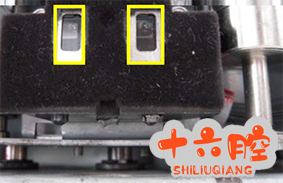
Important note information for cleaning the ITB speed sensor with C751EX and 6751EX to prevent SC449-40 When cleaning two ITB speed sensors, the transmitter and receiver are included (shown in yellow in the figure below).
1. Use a vacuum cleaner or hair dryer to remove dust. 2. Wipe the sensor with a damp cotton cloth. If there is no wet cotton cloth, ordinary wet cloth can be used. If necessary, use clean water instead of chemical agents such as alcohol. Do not use hard objects to scrape during cleaning. Note: The ITB speed sensor has been modified with the new part number D0746208 Steps required after cleaning the ITB speed sensor: 1. Execute SP2-912-001 (Encoder Sn: Adj Light) to adjust the LED beam intensity of the ITB feed back sensor, main sensor, and secondary sensor. 2. Power off and restart the machine. 3. Execute SP2-914-001 (Encoder Sn: Get 1stPhase) to reset and initialize the ITB feed return sensor for this SP. 4. Turn off and restart the machine power. 5. Enter SP2-915-001 and confirm that the value is "1", indicating that the ITB feed return control is effective. If the value is still "0", repeat the above operation until it is changed to "1". 6. Execute SP3011-4, enforce process control self inspection, and conduct comprehensive MUSIC. |
Address of this article:https://073868.com/post/1343.html
Copyright Notice:
For relevant infringements, reports, complaints and suggestions, please send E-mail:weixiuwang68@qq.com





