
|
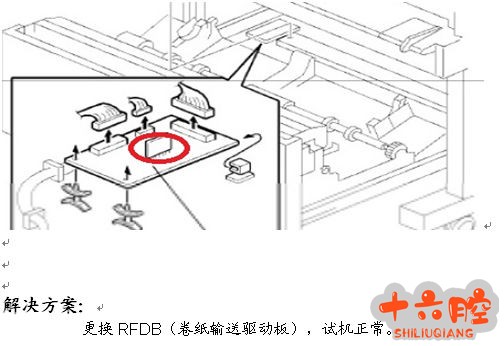
Symptoms: MPW2400 the machine cannot select the paper roll feed, the machine roll feeder correctly installs the paper roll, but when the machine roll is turned off, the paper roll does not pre-feed and the panel displays a prompt to reset the paper roll. Analysis reasons: 1. The roll paper conveying motor is not good. 2.RFDB (roll paper transport drive board) is not good. 3. Poor connection of the roll paper conveyor motor to the RFDB. Measures: 1. Use the SP5804-11 to detect the roll paper conveying motor, and the motor does not operate. 2. Check the wire harness connection in the paper reel of the machine and find no abnormality. 3. Replace RFDB (roll paper conveying drive board), and the test machine is normal. 4. Check the RFDB (roll paper transport drive board) and find a chip burst. The chip position is shown in the figure below:
|
Address of this article:https://073868.com/post/2978.html
Copyright Notice:
For relevant infringements, reports, complaints and suggestions, please send E-mail:weixiuwang68@qq.com
Tags: #W2400 #W3600 #Drive plate #RFDB






