
|
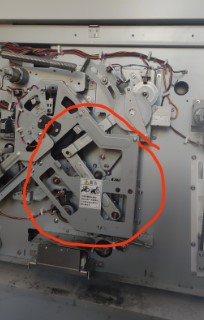
Symptoms A Ricoh DD5441 cardboard with no special position or pattern; Possible causes: Poor paper feeding wheel/motor/gear or gear set/main board Maintenance process 1. Upon on-site inspection of the malfunction, it was found that the machine had irregular paper jams, no fixed positions, and no special patterns; 2. Replace the paper feeding wheel, clean the alignment and all paper paths without improvement; 3. Replace the main motor without improvement; 4. Carefully observe the paper jam phenomenon and find that the machine will make a sudden high-speed sound of the motor when it is about to jam. It is judged that there may be tooth disengagement in the bridge sector gear of the machine, and the sector gear should be replaced without improvement;
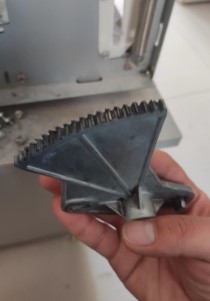
5. Upon re observing the operation of the machine, it was found that the cause of the paper jam was indeed caused by the jumping teeth of the sector gear, but the cause has not yet been identified. Manually shaking the gear set protective cover, it was found that the protective cover was loose. It was determined that it may be the cause of tooth jumping. After removing the protective cover and reinstalling it, the machine did not have any paper jams;
Solution The fault will be resolved by reinstalling the protective cover; |
Address of this article:https://073868.com/post/1228.html
Copyright Notice:
For relevant infringements, reports, complaints and suggestions, please send E-mail:weixiuwang68@qq.com
Tags: #DD5441 #5441 #Paper jam #Paper feeding wheel #Positioning





