
|
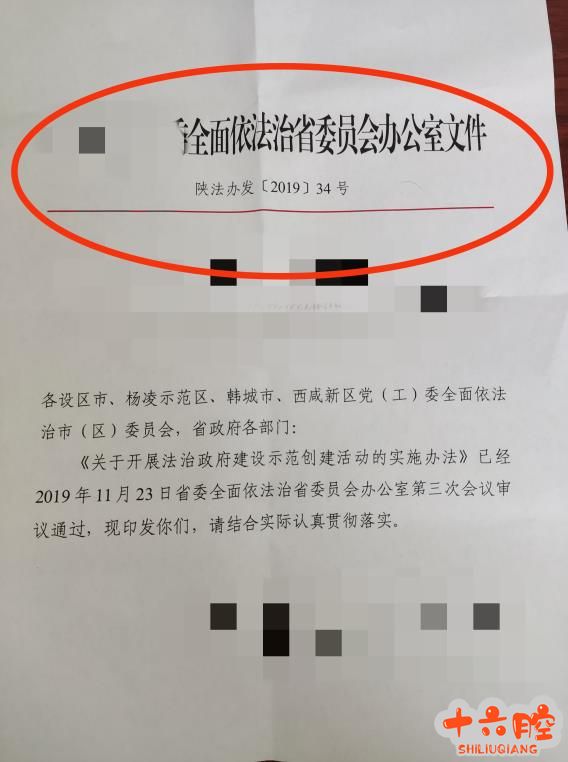
Symptoms: The MP C5503SP model has abnormal results when using the domestic operating system (Tongxin UOS) for red header file printing and output: the font with red header is black and white output (inconsistent with the document itself, which is red), but the long horizontal line below the text is red (consistent with the document). Please refer to the following images for system information and fault samples:
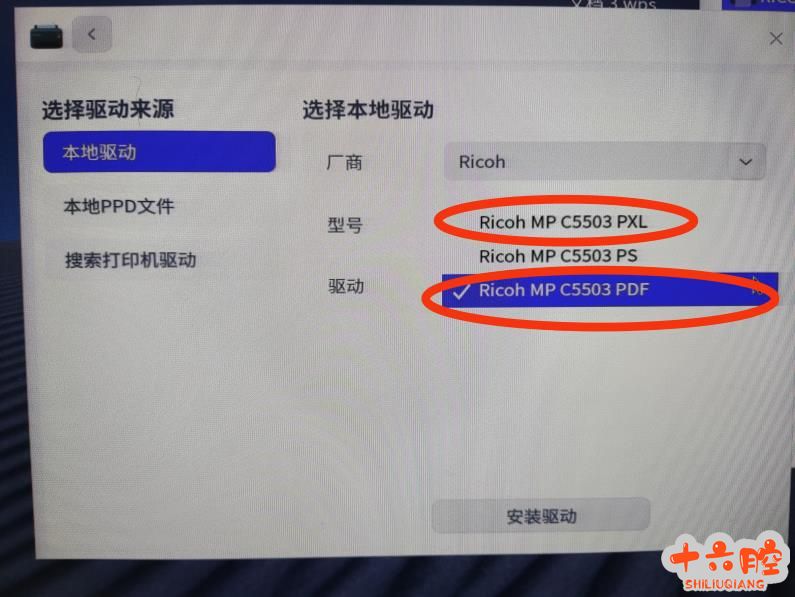
Maintenance process: 1. After uninstalling the driver program on site, download and install it again for testing, and provide the basis for the malfunction. 2. Check if the system version is the latest version and find that the current system version is lower. There is a new version that can be updated. Due to the fact that the client is a confidential unit and cannot upgrade online, this plan could not be implemented. 3. When searching for the driver in the application store, three search results were found (as shown in the figure). Currently, the driver program with PXL suffix is being used, and the above-mentioned fault phenomenon occurs, which cannot meet the customer's output requirements. Ricoh MP C5503 PXL Ricoh MP C5503 PS Ricoh MP C5503 PDF
4. Install and test the above three drivers separately, and ultimately troubleshoot when using the PDF suffix driver. Solution: Replace the driver program that installs the PDF suffix. |
Address of this article:https://073868.com/post/1186.html
Copyright Notice:
For relevant infringements, reports, complaints and suggestions, please send E-mail:weixiuwang68@qq.com
Tags: #C5503 #C3503 #Print Driver #UniTrust UOS #Domestic operating system






