
|
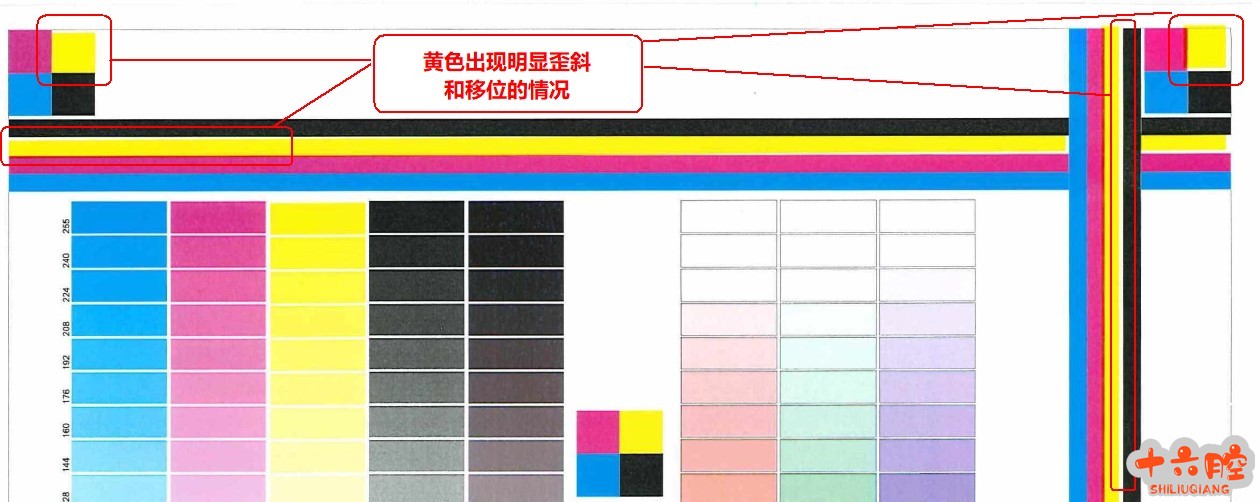
Symptoms When customers print and copy color jobs, the printing effect is poor and there is a malfunction of inaccurate alignment. Maintenance process 1. When performing SP2111-004 line position adjustment, the machine displays adjustment failure; 2. By printing the color test pattern with SP1103-002, it was found that the yellow lines were skewed and shifted;
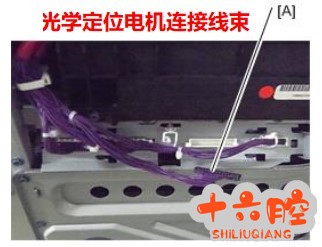
3. During the inspection, it was found that the line position adjustment sample on the transfer belt was skewed when the machine was performing SP2111-004 line position adjustment. Therefore, the wire harness of the laser unit optical positioning motor was removed, and SP2110-005 was executed to re download the laser data and perform laser skew correction. However, SP2111-004 was executed again but still failed the inspection;
4. Remove the laser unit and check the position of the yellow laser reflector inside the laser unit. The reflector position is normal and not displaced; 5. After replacing the laser unit for testing, the machine returned to normal. It is suspected that the yellow optical positioning motor is abnormal, causing the tilt correction adjustment to fail. As there is no separate motor part number, only the entire laser unit can be replaced. Solution After replacing the laser unit for testing, the machine returned to normal. It is suspected that the yellow optical positioning motor is abnormal, causing abnormal correction and adjustment of the tilt, resulting in inaccurate alignment of the printed product. |
Address of this article:https://073868.com/post/1174.html
Copyright Notice:
For relevant infringements, reports, complaints and suggestions, please send E-mail:weixiuwang68@qq.com
Tags: #2000 #3500 #4500 #Poor printing quality #The right position is not allowed






