
|
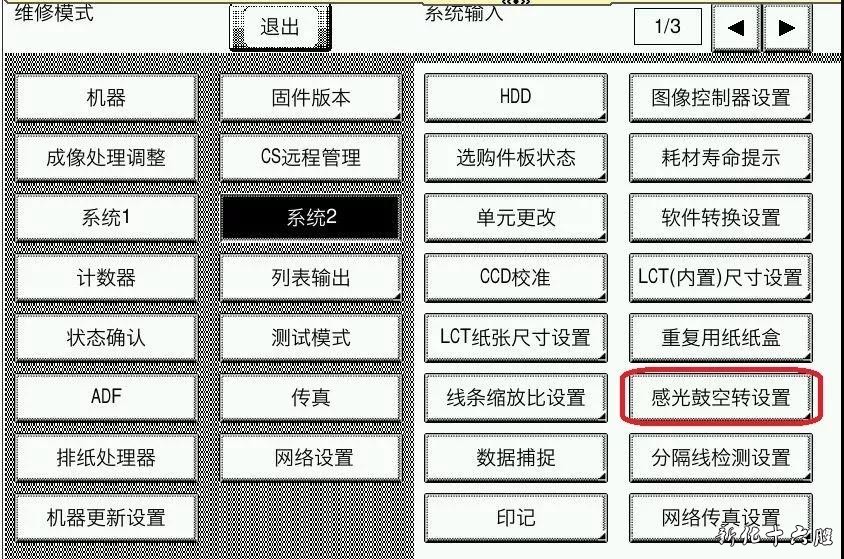
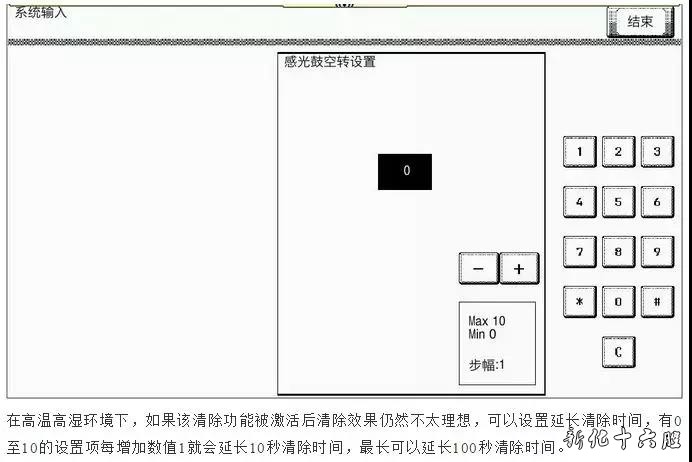
Today, while printing, I found an option called 'Drum Idle Setting' in the 'Maintenance Mode' - 'System 2' section. This option was not available on previous models, and I don't quite understand its purpose; Let me explain to you how to set up and use this feature.
I believe technicians with certain maintenance qualifications have encountered the commonly known problem of "swelling and dampness"; This type of malfunction usually only affects the image quality. Generally, printed materials are relatively simple, and although there are many ways to eliminate them, it can directly affect the service life of the photosensitive drum if it is severe. Moreover, every time there is a "moisture swelling" fault, customers will directly report it for repair, which increases the workload of technicians. Next, let me answer the question that the technician wants to raise now: 1. What causes this phenomenon of moisture absorption?Everyone knows that the main components of air are nitrogen, oxygen, and water, which are easily produced under high temperature and high nitrogen conditionsNitrogen oxides are generated and adhere to the surface of the photosensitive carrier. When combined with moisture, they will invade the surface of the photosensitive carrier and seriously damage the photosensitive coating, affecting the lifespan of the photosensitive carrier; Why does this type of malfunction prefer to occur on high-speed MFP machines (especially large diameter cores)?WoSpeed MFP usually uses larger diameter photosensitive carriers to cope with separation speed and durability, which exposes the surface of the photosensitive manifoldThe area of air will be larger, and in the same printing overflow situation, the rotation period of large-diameter photosensitive carriers will also decrease, causing nitrogen oxides to not be effectively wiped away in a timely manner, and will adhere and invade the surface of the photosensitive manifold. This situation is particularly common in high-speed MFP machines with low print volume. In order to cope with the frequent load and load failures of MFPs, Konica Minolta has added a "photosensitive shutter idle setting" to the new MFP,Reduce or avoid the occurrence of such accidents. This function is enabled by default and cannot be turned off. It will only be activated when the absolute hardness is 15g/m3 or above and the relative hardness is 40% or above (it will not be activated if the conditions are not met); After activation, a certain amount of time will be left for the developing unit to apply toner to the photosensitive surface before printing. The photosensitive unit will idle for a period of time until all compounds on the photosensitive surface are completely removed before executing the printing task.
|
Address of this article:https://073868.com/post/953.html
Copyright Notice:
For relevant infringements, reports, complaints and suggestions, please send E-mail:weixiuwang68@qq.com
Tags: #Ke Mei #Photocopier #Photosensitive drum #Idle setting







