|
Today, I will share with you the principles and solutions for missing/garbled characters in printed output.
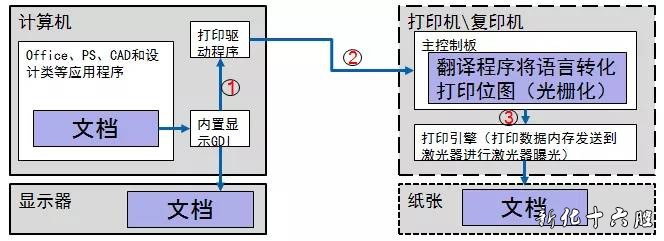
① The Windows operating system sends the document to the backend print pool queue, waiting for the printer driver to translate the page. ② Printer drivers (PS, PCL) translate documents into machine language data (page description language). ③ The printer control board translates machine language data into bitmap light points that can be used by the laser (RIP rasterization).
<措施> 1. Install font files in the output computer and printer (see TSG2107Q3 documentation for font installation). 2. Package the required font files when saving the file. 3. Use bitmap fonts instead in the print driver settings. 4. Convert to PDF or XPS file for printing. <建议> 1. Download and use the latest PCL6 driver 2. Convert PDF printing files to vector curves and layer vectorization for non operating system language fonts. reference resources: https://jingyan.baidu.com/article/a681b0dee5db593b19434667.html 3. Install print drivers on computers using genuine system font libraries and applications 4. KM comes standard with an MFP built-in font library, which includes 80 PCL fonts (European) and 137 PS fonts (European), including HGMinchoL, HGPMinchoL, HGGothic B, and HGPGothicB (Japanese). Need to expand built-in fonts can be manually loaded (configure hard drive machine) or purchased as an option: Barcode font: UK211+LK106 Unicode font: UK211+LK107 OCR font: UK211+LK108 |
Principle and solution of missing/garbled characters in printed output
325
0