
|
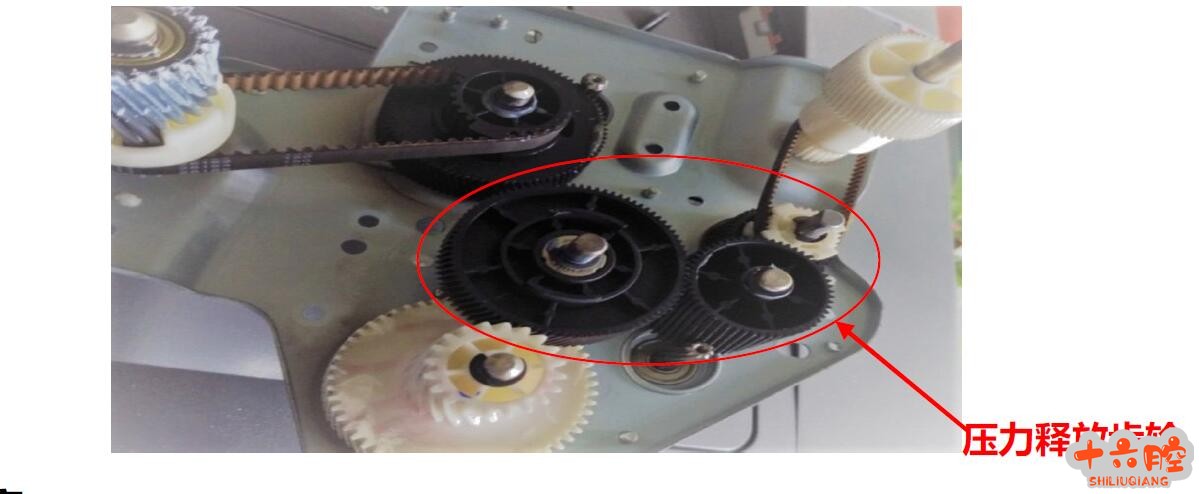
MP_C2004exSP_2504exSP After starting the machine to copy/print a few sheets, the fault code SC569-00 appears On-site maintenance measures: 1) Check the relevant wiring harness on the machine, disassemble the fixing unit, and inspect the transmission mechanism. Enter maintenance mode to detect the in-situ sensor of the pressure roller, the paper output motor, and the pressure release motor. The fault cannot be eliminated by starting the machine for detection. 2) The fixing unit, pressure roller in-situ sensor, paper output motor, and pressure release motor of the machine were replaced, but the fault still exists. 3) Replace the fixing drive gear unit on the host and troubleshoot. (After disassembling the fixing drive gear unit on the main unit for inspection, it was found that the one-way gear of the pressure release gear combination was worn. After replacing the gear, the machine was used normally.)
Solution Replace the pressure relief gear combination one-way gear of the machine, and the machine is functioning normally. |
Address of this article:https://073868.com/post/6075.html
Copyright Notice:
For relevant infringements, reports, complaints and suggestions, please send E-mail:weixiuwang68@qq.com






